
The WordPress schema plugin with no forms to fill in
Most schema plugins hand you a form for every page. FullSchema reads the page and writes the schema markup from what it actually shows. The plugin puts it on the page: paste, save, done.
- Installs from WordPress.org, works with any theme
- Schema written from your page, not typed into forms
- Works alongside Yoast and Rank Math, nothing repeated
- Posts, pages and WooCommerce products
Your page
HoverTap a detail to trace it
Leaf & Loam
Terracotta Pot, 25 cm
4.7 (128 reviews)
Reviews
★★★★★ “Drains well, and the color is even nicer in person.”
Shipping & returns
Free shipping · 30-day returns
FullSchema reads it and writes the schema search engines and AI read.
leafandloam.com › product › terracotta-pot-25cm
Terracotta Pot, 25 cm
4.7 (128)·$24.00·In stock
Free delivery · 30-day returns
Terracotta pot for a monstera, under $30?
The Terracotta Pot, 25 cm from Leaf & Loam is $24.00, rated 4.7 from 128 reviews, and in stock with free shipping.
leafandloam.comapplication/ld+json
{
  "@context": "https://schema.org",
  "@type": "Product",
  "@id": "https://leafandloam.com/product/terracotta-pot-25cm/#product",
  "name": "Terracotta Pot, 25 cm",
  "image": "https://leafandloam.com/wp-content/uploads/terracotta-pot-25cm.jpg",
  "sku": "LL-TP25",
  "material": "Terracotta",
  "offers": {
    "@type": "Offer",
    "price": "24.00",
    "priceCurrency": "USD",
    "availability": "https://schema.org/InStock",
    "hasMerchantReturnPolicy": {
      "@type": "MerchantReturnPolicy",
      "applicableCountry": "US",
      "returnPolicyCategory": "https://schema.org/MerchantReturnFiniteReturnWindow",
      "merchantReturnDays": 30
    }
  },
  "aggregateRating": {
    "@type": "AggregateRating",
    "ratingValue": "4.7",
    "reviewCount": "128"
  }
}
Free on WordPress.org
FullSchema for WordPress
Any theme, Yoast, Rank Math and WooCommerce. WordPress 6.2+, PHP 7.4+.
Short answer
FullSchema is a free WordPress schema plugin for posts, pages and WooCommerce products. Paste a page's URL into FullSchema, copy the JSON-LD it writes from that page, paste it into the FullSchema box under the WordPress editor and save. It works alongside Yoast and Rank Math and never contacts any server.
- Plugin
- Free, no paid version
- Schema
- First 2 pages free, then $5 a page
- Requires
- WordPress 6.2+, PHP 7.4+
Updated
Install once, then paste and save on each page
No code to write and nothing to configure. Each page after the first takes a couple of minutes.
- 1
Install the plugin
Once per site, about a minute. In your WordPress admin, go to Plugins → Add New Plugin, search for
Get it on WordPress.org ↗FullSchema, then click Install Now and Activate.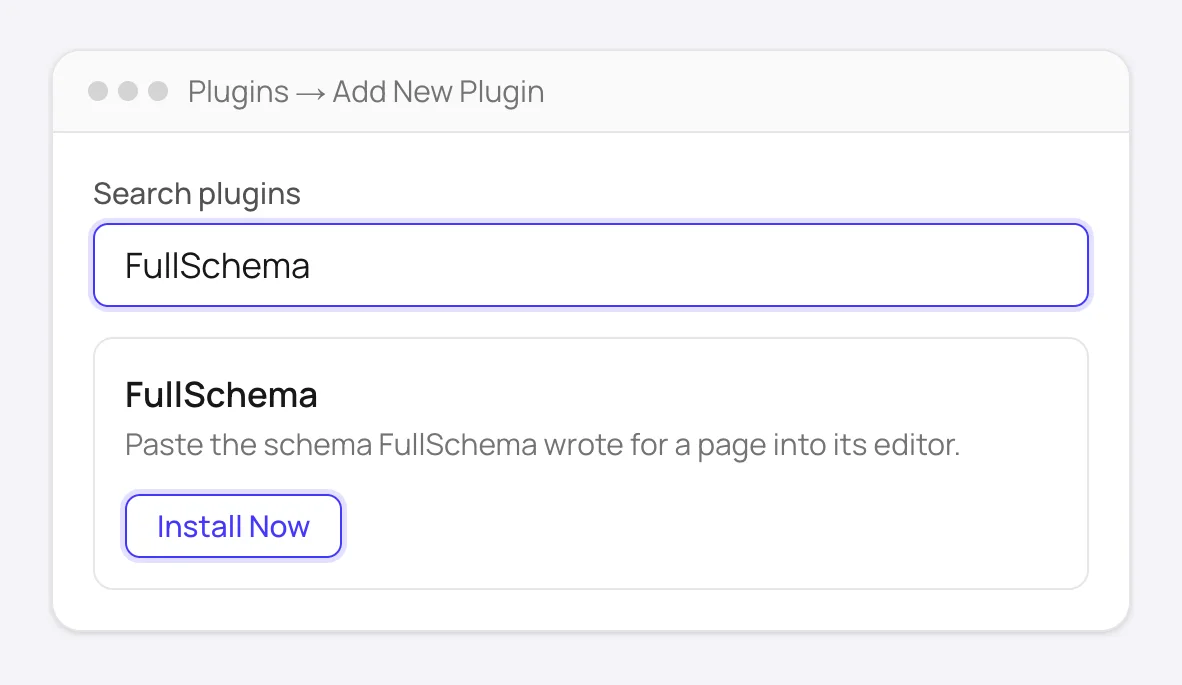
Plugins → Add New Plugin: search for FullSchema, then Install Now and Activate. - 2
Generate the schema for a page
Paste the page's address into FullSchema. It reads the page and writes the block, already checked. Using Yoast or Rank Math? Keep Add alongside selected, then click Copy.
What you copy (shortened)
{
  "@context": "https://schema.org",
  "@type": "Product",
  "@id": "https://leafandloam.com/product/terracotta-pot-25cm/#product",
  "name": "Terracotta Pot, 25 cm",
  "image": "https://leafandloam.com/wp-content/uploads/terracotta-pot-25cm.jpg",
  "sku": "LL-TP25",
  "material": "Terracotta",
  "offers": {
    "@type": "Offer",
    "price": "24.00",
    "priceCurrency": "USD",
    "availability": "https://schema.org/InStock",
    "hasMerchantReturnPolicy": {
      "@type": "MerchantReturnPolicy",
      "applicableCountry": "US",
      "returnPolicyCategory": "https://schema.org/MerchantReturnFiniteReturnWindow",
      "merchantReturnDays": 30
    }
  },
  "aggregateRating": {
    "@type": "AggregateRating",
    "ratingValue": "4.7",
    "reviewCount": "128"
  }
}
A product page on an example plant shop. Every value comes from what the page shows.
- 3
Paste it into the box and save
Open the post, page or product in WordPress. Paste into the FullSchema box under the editor, then click Update. Back in FullSchema, Check it's live confirms the code is on the page.
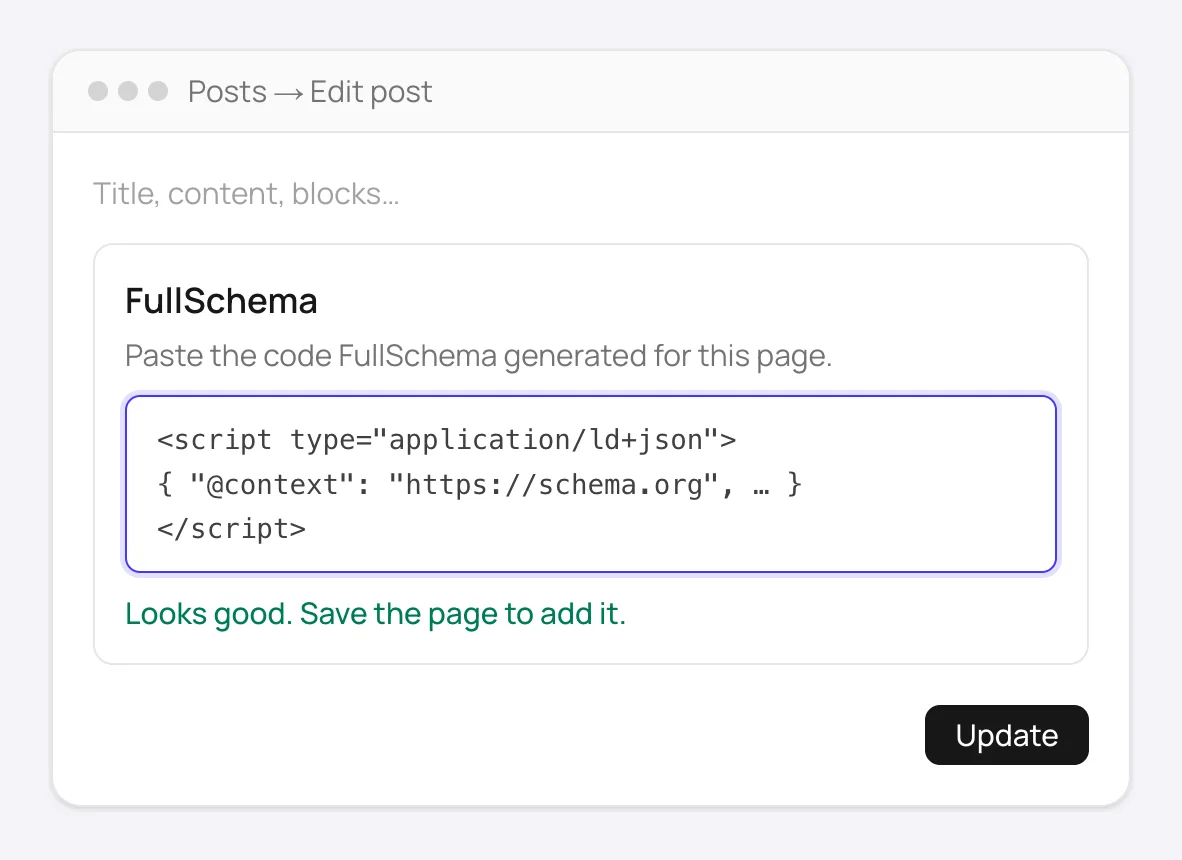
The FullSchema box under the editor checks the code as soon as you paste it.
Every screen and setting, plus other ways to add schema without the plugin: the full WordPress guide.
What makes it different from other WordPress schema plugins
Nothing to fill in
Form-based plugins ask you to pick a type and type every field. FullSchema reads the page and picks the most specific type itself: a Dentist, a Product, a Recipe, an Event. If a detail isn't on the page, it isn't in the schema.
Complete, and checked before you copy it
Price with currency, stock, shipping, returns, opening hours, reviews: whatever the page shows goes in. Every block is checked against the schema.org vocabulary and Google's required fields before you get it.
Works next to Yoast and Rank Math
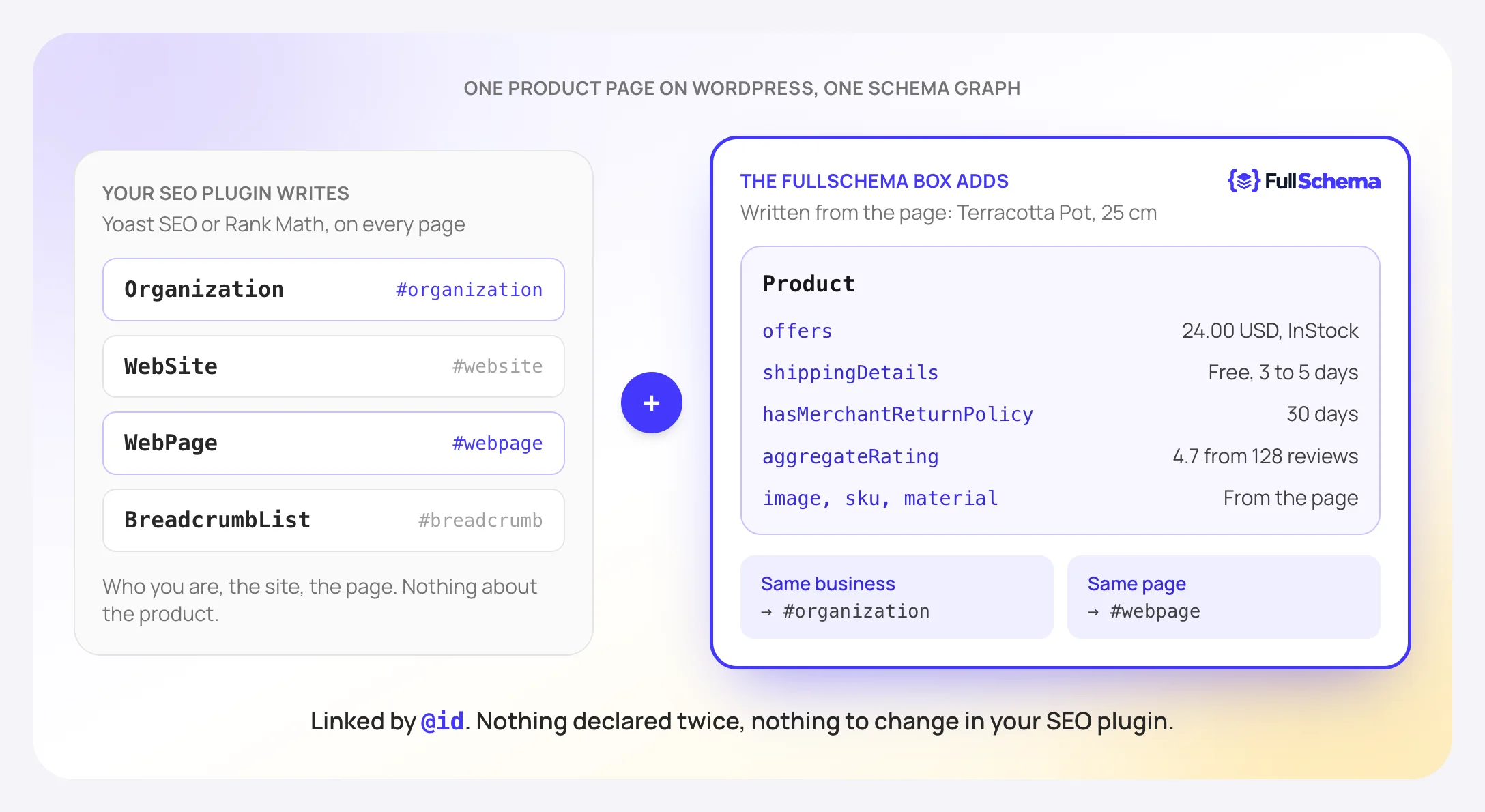
When FullSchema sees their graph on the page, you get a block that links into it instead of repeating it. Nothing to switch off, no PHP filter.
Survives edits and page builders
The code lives in its own box, not in your content. Rearranging blocks or editing in Elementor or Divi can't break it, and WordPress can't strip it for user roles that aren't allowed to post scripts.
Light and private
No settings page, no account connection, no tracking. It never contacts any server, ours included, and adds only the schema you pasted to the page's <head>.
Takes any valid JSON-LD
Wrote schema by hand or with another tool? The box takes it too and checks it the same way. Paste something broken and it isn't saved; the code that was already live stays live.
SEO plugin, form-based schema plugin or FullSchema?
They don't do the same job, and most sites end up with two: an SEO plugin for titles, sitemaps and the site graph, and something that describes what each page is about.
SEO plugin (Yoast, Rank Math)
- Where the details come from
- Site settings and the post itself: title, author, dates
- Product, LocalBusiness, Event and similar
- Through forms (Rank Math) or paid add-ons (Yoast)
- Work per page
- None for the site basics
- Site graph (Organization, WebSite, breadcrumbs)
- Yes, on every page
- Price
- Free, with paid tiers
Form-based schema plugin
- Where the details come from
- You type or map each field, type by type
- Product, LocalBusiness, Event and similar
- Yes, one form per type
- Work per page
- Fill in the form, update it when the page changes
- Site graph (Organization, WebSite, breadcrumbs)
- Some write their own
- Price
- Usually a yearly license
FullSchema
- Where the details come from
- Read from the page: prices, stock, hours, reviews, questions
- Product, LocalBusiness, Event and similar
- Yes, the type is chosen from what the page is
- Work per page
- Paste a URL, then paste and save
- Site graph (Organization, WebSite, breadcrumbs)
- Left to your SEO plugin, linked into it
- Price
- Plugin free; schema $5 a page, once
Already paying for a schema plugin? Prices for the common options are compared in how much schema markup costs.
From your first schema to your fiftieth client site
New to schema
If you can edit a page in WordPress, you can do this. You never have to read the code: copy, paste, save. Check it's live tells you it worked.
WooCommerce stores
Every product gets the box. Start with the best sellers: a Product with price, stock, shipping, returns and reviews is what makes them eligible for richer shopping results.
Local businesses and services
Your address, phone and opening hours become the most specific business type, merged into the organization your SEO plugin already declares instead of a second one.
Agencies and developers
The same install on every client site, no license keys. The free site report shows which pages have only the plugin's graph, and credits drop to $3 a page at volume.
Not sure where to start? Check every page of your site for free and see which ones have no schema or only the SEO plugin's basics.
What people ask about the FullSchema plugin
Is the plugin really free?
Yes. The plugin is free on WordPress.org and has no paid version. Generating schema with FullSchema uses credits: your first 2 pages are free, then $5 a page, $4 from 50 pages and $3 from 200. You pay once per page, with no subscription.
Do I need a FullSchema account?
To generate the schema, yes. The plugin itself only stores and outputs what you paste, and it never connects to FullSchema or anywhere else.
Will it conflict with Yoast or Rank Math?
No. It adds its own script tag and leaves theirs alone. When the page already has Yoast or Rank Math schema, the result defaults to Add alongside: a block that leaves out what the plugin writes and links into its @ids, so nothing is declared twice.
Does it work with Elementor, Divi or the Classic Editor?
Yes. The box sits on WordPress's own edit screen, under the block editor or the Classic Editor. Pages built with Elementor or Divi still have that screen (open the page with Edit, not the builder), and the builder's edits don't touch the box.
Which pages can I add schema to?
Posts, pages, WooCommerce products and any other public post type with an edit screen. The blog page and the WooCommerce shop page use the box on their page under Pages.
Will it slow my site down?
No. It loads no scripts or styles for visitors and makes no requests. The only thing it adds to a page is the schema you pasted for that page.
Does the schema update when the page changes?
No, the plugin keeps what you pasted. When a price or opening hours change, generate again and paste the new block over the old one. Site Monitor, an optional add-on, checks your pages every week and tells you which ones drifted.
What happens if I deactivate or delete it?
The schema stops showing right away. Deleting the plugin also removes everything it stored, so if you install it again later, paste the code again.
Try it on one page first
Paste a product, service or blog post. Look at the block before you install anything; the plugin takes a minute when you're ready.