
Add schema markup to a Duda site
Give Google and AI assistants your hours, phone, address and services exactly as your page shows them. Every Duda page has its own box for it.
- No app, just the page's
Header HTMLbox - Paste the full block, save, republish
- Site-wide details go in
Settings → Header HTMLonce - LocalBusiness, Service, FAQ and more
Your page
HoverTap a detail to trace it
Law firm · Denver, CO
Keller & Moss Law
Estate planning · Business law · Real estate
Hours
Mon to Fri, 9 AM to 6 PM
Contact
(303) 555-0166
1700 Lincoln St, Suite 2400, Denver, CO 80203
FullSchema reads it and writes the schema search engines and AI read.
What search engines know
LegalService
- Business
- Keller & Moss Law
- Services
- Estate planning, Business law, Real estate
- Hours
- Mo-Fr 09:00-18:00
- Phone
- +1-303-555-0166
- Address
- 1700 Lincoln St, Suite 2400, Denver, CO 80203
Estate planning lawyer in downtown Denver?
Keller & Moss Law at 1700 Lincoln St, Suite 2400 is open Mon to Fri, 9 AM to 6 PM. Call (303) 555-0166 to book. They handle estate planning, business law, real estate.
kellermoss.com<!-- this page only --><script type="application/ld+json">{"@context": "https://schema.org","@graph": [{"@type": "LegalService","@id": "https://kellermoss.com/#firm","name": "Keller & Moss Law","description": "Denver law firm for estate planning, business law and real estate.","url": "https://kellermoss.com/","image": "https://kellermoss.com/media/office.jpg","logo": "https://kellermoss.com/media/logo.png","telephone": "+1-303-555-0166","email": "office@kellermoss.com","priceRange": "$$$","address": {"@type": "PostalAddress","streetAddress": "1700 Lincoln St, Suite 2400","addressLocality": "Denver","addressRegion": "CO","postalCode": "80203","addressCountry": "US"},"openingHoursSpecification": [{"@type": "OpeningHoursSpecification","dayOfWeek": ["Monday","Tuesday","Wednesday","Thursday","Friday"],"opens": "09:00","closes": "18:00"}],"areaServed": { "@type": "City", "name": "Denver" },"hasOfferCatalog": {"@type": "OfferCatalog","name": "Practice areas","itemListElement": [{"@type": "Offer","itemOffered": { "@type": "Service", "name": "Estate planning" }},{"@type": "Offer","itemOffered": { "@type": "Service", "name": "Business law" }},{"@type": "Offer","itemOffered": { "@type": "Service", "name": "Real estate" }}]},"sameAs": ["https://www.linkedin.com/company/keller-moss-law"]},{"@type": "WebSite","@id": "https://kellermoss.com/#website","url": "https://kellermoss.com/","name": "Keller & Moss Law","publisher": { "@id": "https://kellermoss.com/#firm" }},{"@type": "WebPage","@id": "https://kellermoss.com/#webpage","url": "https://kellermoss.com/","name": "Keller & Moss Law | Estate planning and business lawyers in Denver","isPartOf": { "@id": "https://kellermoss.com/#website" },"about": { "@id": "https://kellermoss.com/#firm" },"inLanguage": "en-US"}]}</script>Short answer
To add schema markup to Duda, open the page's settings from Pages, go to its SEO screen, paste the complete JSON-LD block, script tags included, into Header HTML, save and republish. Details that are true on every page, like your Organization, go once in Settings → Header HTML.
- Where it goes
- Page SEO settings → Header HTML
- Site-wide
- Settings → Header HTML
- Setup time
- ~3 minutes
Updated
How to add it
- 1
Generate the code
Paste the published page's URL, not the editor's preview link.
Copygives you the block with its<script>tags; Duda's Header HTML keeps code only when it's a complete tag. - 2
Find the page's Header HTML
In the editor, open
Pages, open the settings for the page, and go to itsSEOscreen. TheHeader HTMLbox is there, next to the meta title and description. - 3
Paste and save
Paste the block into
Header HTMLand save. Duda removes code it considers invalid, so paste the complete block, script tags included.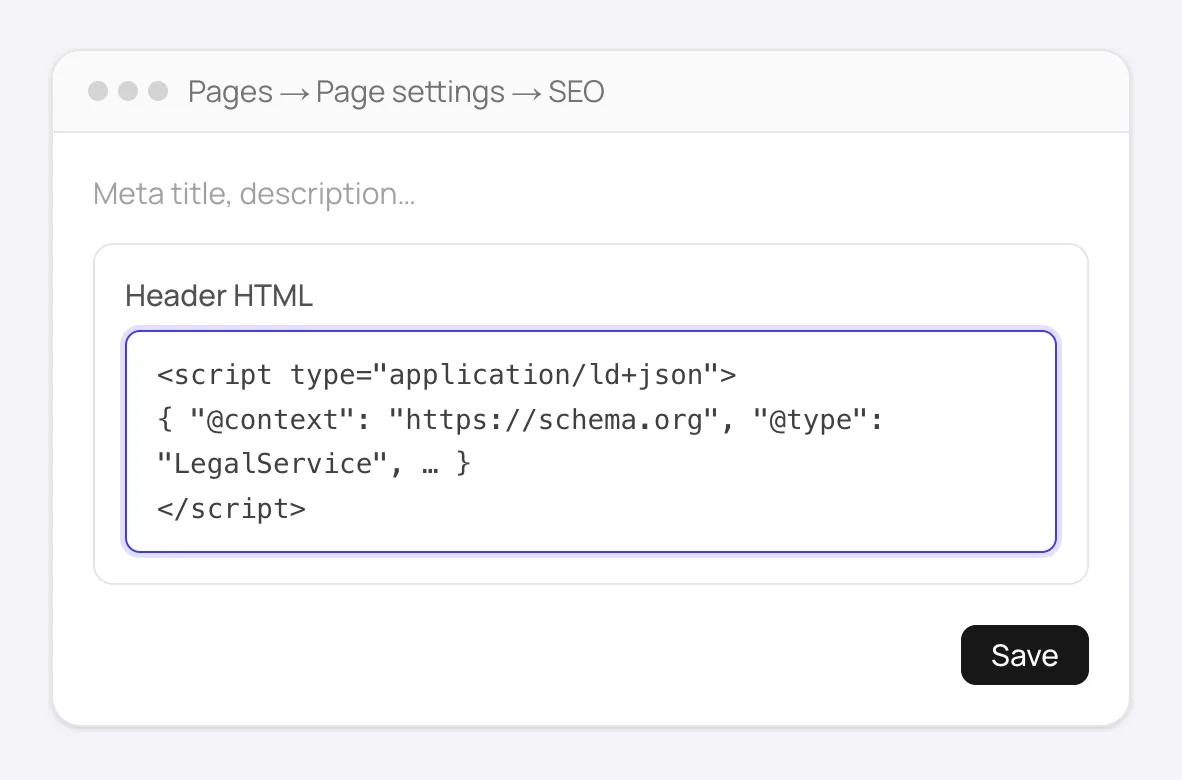
The page's SEO screen: paste the complete block, script tags included, into Header HTML. - 4
Add site-wide details once
For your Organization block, which is true on every page, use
More → Settings → Header HTMLinstead. Keep everything page-specific out of it.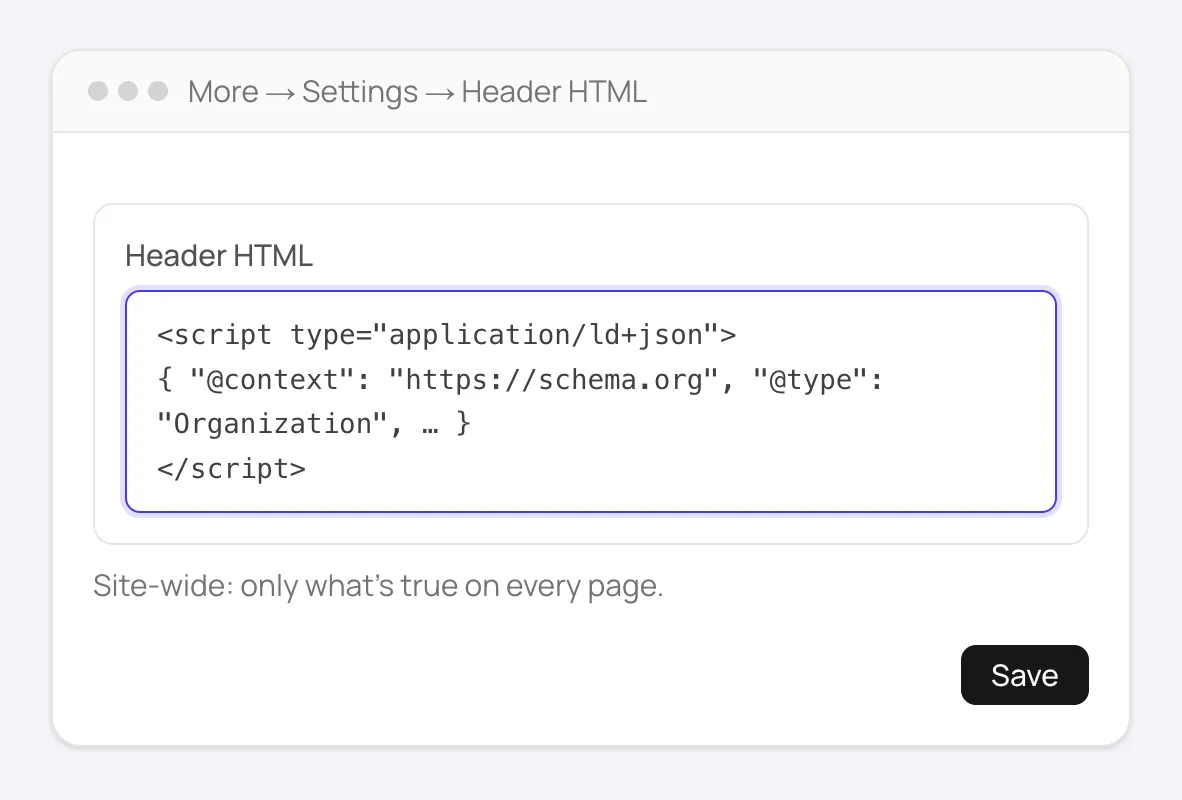
More → Settings → Header HTML: one Organization block for the whole site, nothing page-specific. - 5
Republish and verify
Edits go live only after you republish. Then open the live page and check
View Page Sourceforapplication/ld+json, or run the URL through Google's Rich Results Test.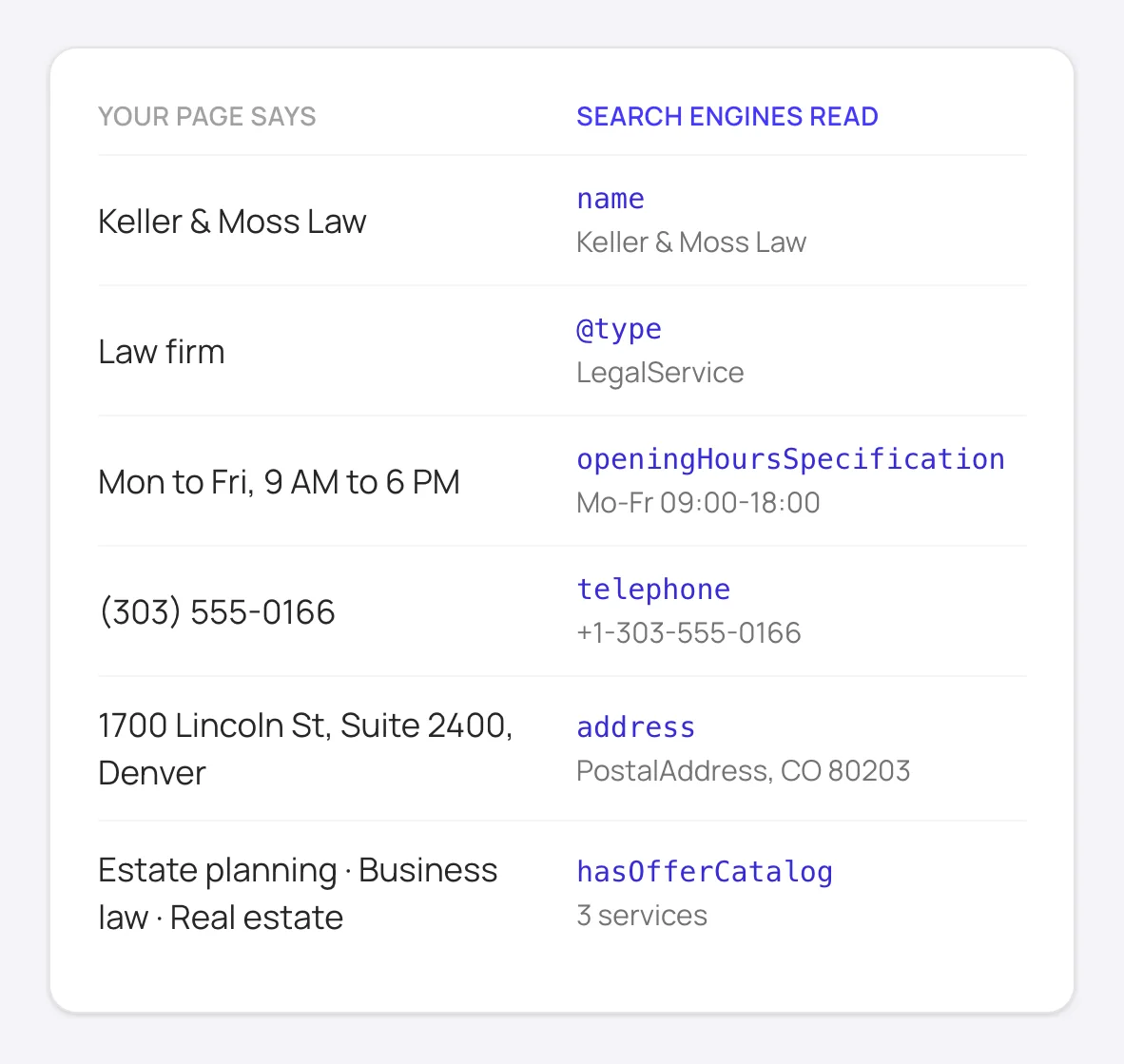
What the markup tells search engines and AI assistants: the same details your page shows, in a form they can read.
Good to know
A product or service block in the site-wide box would claim every page is about that product. Keep those in the page's own box.
If you're a client on an agency's Duda account and can't see SEO settings, your agency controls that permission. Send them the block, or ask them to turn SEO editing on for you.
Dynamic pages can take a full block per item. Add a text field for the schema to the collection, paste each item's code into it, then open the dynamic page's Header HTML and connect that field with the Connected Data icon.
Duda writes business schema for one location only. For several locations, Duda's own advice is to turn its generated schema off and give each location page its own block.
How to add schema to Duda manually
Without FullSchema: what the same result takes by hand.
Duda covers part of the job on its own. The rest is up to you, page by page.
- 1. Complete Business Info first
- Duda builds the business markup from the site's Business Info. Fill in the name, address, phone and hours completely, and keep them the same as the site's contact page. Blog posts and native store products get their markup automatically.
- 2. Write page-specific blocks
- For services, locations and FAQs, write a JSON-LD block by hand: the most specific schema.org type, the fields Google's documentation lists, and only details the page shows. Paste it into that page's
Header HTMLin its SEO settings. On dynamic pages, Connected Data can fill in values from the collection. - 3. Validate the live pages
- Run the published URLs through the Rich Results Test. Check that your blocks and Duda's automatic business markup list the same phone, address and hours.
- 4. Keep it current across client sites
- Hand-written blocks don't follow page edits. If you manage sites for clients, note which pages carry custom schema so they get updated when the client changes prices, hours or services.
What people ask about Duda schema, answered
Collected from Reddit, the Duda community and SEO forums. Straight answers, including the cases where you don't need us.
Duda already adds LocalBusiness schema from Business Info. Will mine conflict?
Two blocks describing the same business aren't an error, but they should agree. If they list different phones or hours, Google picks one. FullSchema reads the details from your live page, so its block matches what visitors see; keep Business Info up to date with the same details.
I pasted the code into Header HTML and it disappeared after saving.
Duda strips code it can't parse. The usual cause is a partial paste, like the JSON without its script tags or a block cut off at the end. Copy again with the Copy button and paste the whole block.
Can I add schema to dynamic pages?
Yes, two ways. Keep a full block per item in a text field of the collection and connect that field in the dynamic page's Header HTML with the Connected Data icon; then each item is a paste into its own field. Or write one block in Header HTML and connect the collection's fields to the values that change, using a generated block for one item page as the model.
We manage dozens of client sites on Duda. Is there a faster way?
Add each client's domain to FullSchema: the free site report lists every page from the sitemap and shows which ones have no schema. Generate for the pages that matter, paste each block into its page's Header HTML, and Monitor tells you when a page changes and its schema no longer matches.
How should a multi-location business set this up?
Give each location page its own block with that location's address, phone and hours, pasted into that page's Header HTML. The home page carries the business as a whole. That way each location can show up for searches near it, and no page claims an address it doesn't list.
The page changed. Do I need to regenerate the schema?
If prices, hours, services or contact details changed, yes: replace the block in the page's Header HTML and republish. Monitor checks your pages every week and tells you when a page no longer matches its schema, so you don't have to remember which ones changed.
Not sure what your Duda pages have today? The site report is free.
Check every page freeDuda schema markup questions
Page Header HTML or site-wide Header HTML?
The page's own box for anything about that page. The site-wide box for your Organization only, if at all.
Does Duda put Header HTML in the page source?
Yes. It's added to the <head> of the published page, so crawlers get it without running JavaScript. View Page Source on the live URL confirms it.
My Duda site has several languages. Does each need its own block?
Yes. Each language version is a separate page with its own URL, so each gets a block written in that language, with the text that page shows. Generate for each version's URL.
Ready to generate Duda schema?
Paste your page's URL and FullSchema handles the rest. No dropdowns, nothing to fill in by hand.