
Your schema was right the day you installed it.
Then prices change, pages move and a theme update drops the block. Site Monitor re-checks the structured data on every page once a week and emails you what broke, where, and how to fix it.
- Price
- $12 per site / month
- Checks
- Weekly, by email
- Commitment
- None, cancel any time

FullSchema <hello@fullschema.app>
example-bakery.com: 2 new issues found
example-bakery.com: 2 new issues found
Site Monitor checked 46 pages on example-bakery.com: the schema on each page, whether it can still be indexed, and whether it matches what the page says.
92
Health score
5
Open issues
2
Fixed
Health score 92 (down 3 from last week).
New this week
FullSchema block removed
Paste the block back into the page. A theme or plugin update is the usual cause.
example-bakery.com/locations/pearl-district
Schema no longer matches the page
Regenerate the schema and replace the block on the page.
example-bakery.com/cakes/carrot-cake
Still open
Page is set to noindex (1 page) · Schema no longer matches the page (1 page) · Canonical points to another page (1 page)
Review and fixA weekly report, as it lands in your inbox
Nothing tells you when schema stops being true
Schema is a copy of what the page says. The page keeps changing, the copy doesn't. Google won't email you about it, and Search Console only reports the types it shows as rich results, often weeks later.
The price went up
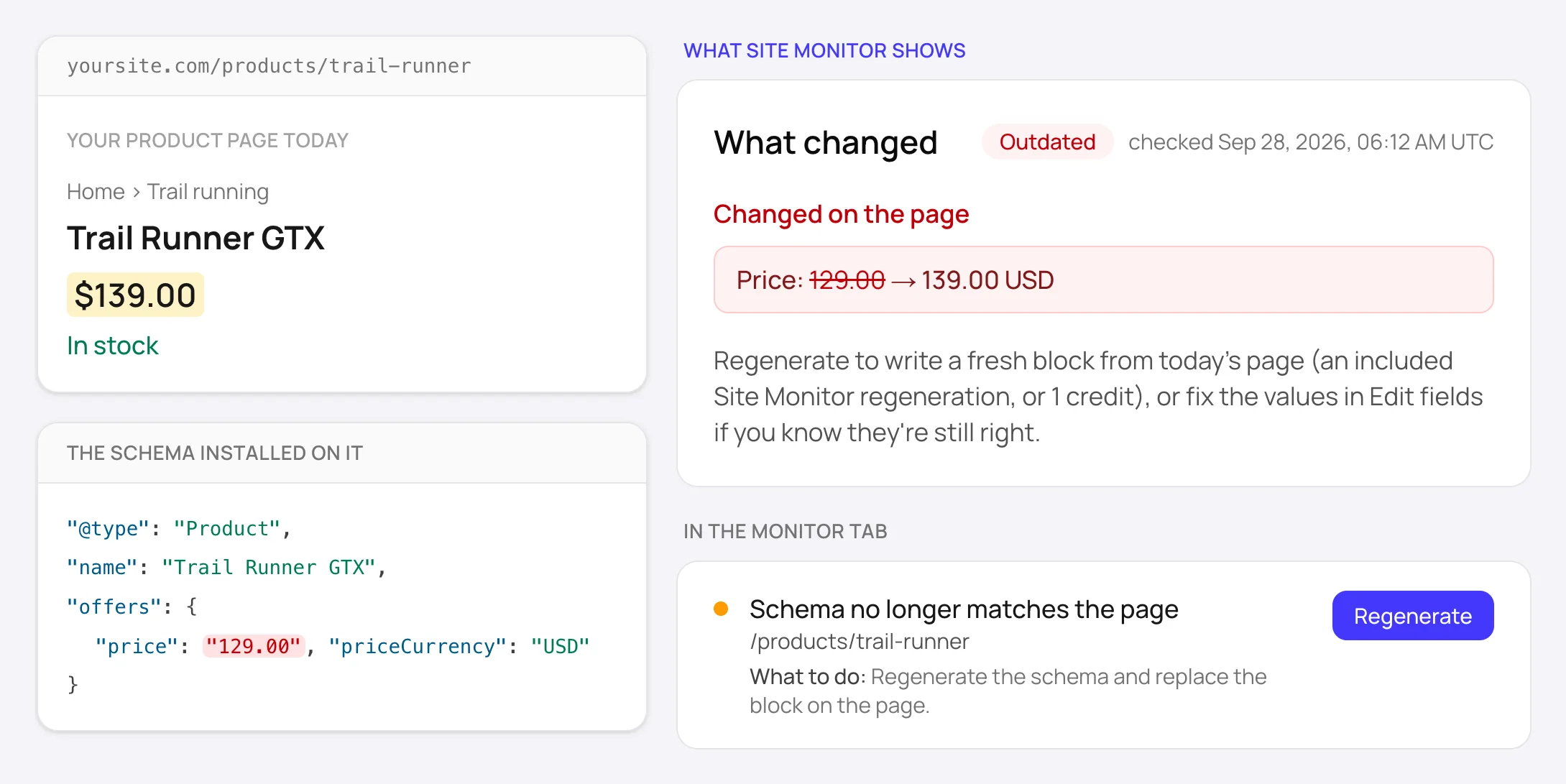
The page says $139, the schema still says $129. Google treats a price that doesn't match the page as misleading and can drop the rich result.
A theme update ate the block
Code pasted into a theme file is gone after the next update. The page looks the same, the schema isn't there anymore.
A plugin broke its own markup
An SEO plugin update ships a syntax error or a second Organization. Nobody notices until Search Console does, weeks later.
Someone ticked noindex
A staging setting reaches the live site, or a page starts redirecting. The schema is fine, Google just stopped reading the page.
Turn it on once. It checks every week.
- 1
Turn it on for a site
Open the Monitor tab in your dashboard and switch it on for any site in your account. The first check starts within 10 minutes.
- 2
Every week, every page is re-read
Each page with a FullSchema block is compared with what the page says today. Every JSON-LD block on the page, including plugin and theme markup, is checked against schema.org and Google's rules. Noindex, canonical and redirects are checked too, and your sitemap is scanned for new pages.
- 3
You get a short report
A health score, what's new since last week, what's still open and what you fixed. Each issue says what to do. Outdated schema is one click to regenerate.
One score per site, and a list of what to fix
Critical issues first, new ones marked. Every row names the page and the fix. If it's intentional, like a thank-you page set to noindex, hit Ignore and it stops counting against the score.
Health score
Open issues
Next check
Issues
FullSchema block removedNew
/locations/pearl-district
What to do: Paste the block back into the page. A theme or plugin update is the usual cause.
Page is set to noindex
/catering
What to do: Remove the noindex tag if the page should appear in search. Ignore this if it's intentional.
Schema no longer matches the pageNew
/cakes/carrot-cake
What to do: Regenerate the schema and replace the block on the page.
Schema no longer matches the page
/locations/alberta-street
What to do: Regenerate the schema and replace the block on the page.
Canonical points to another page
/order
Canonical: https://example-bakery.com/menu
What to do: Point the canonical at this page, or put the schema on the canonical page.
Eleven things that quietly break schema
Each one shows up in the report with the page it's on and what to do about it. Red ones cost you rich results now; amber ones are worth fixing this week.
Schema that stopped being true
Schema no longer matches the page
Something the schema states, like a price, phone or date, changed on the page.
FullSchema block removed
The schema you installed is no longer on the page, so search engines can't read it.
Page returns 404
The page no longer exists, so its schema is gone too.
Schema Google can't use
Broken JSON-LD on the page
A schema block has a syntax error, so search engines skip it entirely.
Not eligible for rich results
The page's schema is missing something Google requires for this result type.
Unknown schema type
A type name isn't in schema.org, often a typo, so search engines ignore that block.
Pages Google won't read
Page is set to noindex
Google won't index a noindex page, so its schema can't earn rich results.
Page now redirects
Search engines index the destination, not this address, so the schema here isn't used.
Canonical points to another page
Google treats the other page as the main version and may ignore this page's schema.
Page couldn't be reached
The server didn't answer or returned an error, so nothing on the page could be checked.
Plus new pages in your sitemap, listed so you can decide whether they need schema.
What changed
Changed on the page
- Phone: +1 503-555-0142 → +1 503-555-0187
In the schema, no longer on the page
- Closing time: 18:00
On the page now, not in the schema
- Rating: 4.8 (212 reviews)
Regenerate to write a fresh block from today's page (an included Site Monitor regeneration, or 1 credit), or fix the values in Edit fields if you know they're still right.
Old value, new value, one click
When a fact in your schema no longer matches the page, you see both: the phone number the schema has and the one the page shows now. Regenerate writes a fresh block from today's page. You paste it in, done.
- Prices, phones, emails, addresses and ratings, side by side
- New facts on the page that the schema doesn't have yet
- 3 regenerations a month included
One price per site. Nothing to sign.
Monitor is optional and separate from credits. Turn it on for the sites that matter, leave it off for the rest.
- Weekly check of up to 500 pages per site
- Weekly email report with a health score and trend
- Old and new value for every changed fact
- Plugin and theme schema checked against Google's rules
- Noindex, canonical and redirect alerts
- New pages from your sitemap
- 3 regenerations a month included
$12per site / month
Cancel any time, from your dashboard, in one click.
After the 3 included regenerations, each one is 1 credit ($5 or less).
Credits and packs are on the pricing page.
Before you turn it on
What people ask about Site Monitor, answered straight, including what it can't do.
Something else? Ask us directly.
Do I need Site Monitor to use FullSchema?
No. Generating and installing schema never requires it, and the Check now button on a site re-verifies every installed block for free, up to once an hour. Monitor is for when you'd rather not have to remember to press it.
Which pages does it check?
Every page in the site where you've generated schema with FullSchema, plus every page that carries schema from somewhere else, like Yoast, Rank Math, Shopify or your theme. Up to 500 pages per weekly run. New pages that show up in your sitemap are listed in the report.
Does it check schema I didn't make with FullSchema?
Yes. Every JSON-LD block on a checked page is parsed and validated: syntax errors, missing fields Google needs for a rich result, misspelled types. Monitor doesn't touch those blocks. It tells you which plugin or page has the problem and what to change.
How is the health score worked out?
It runs from 0 to 100 across the pages checked that week. A page with no open issue counts in full, one with only warnings counts half, and one with a critical issue counts zero. Issues you mark as Ignore (a page that's noindex on purpose, say) stop counting. The report shows how it moved since last week.
What happens when a price or phone number changes?
The report names the page and shows the old value next to the new one. Hit Regenerate and FullSchema writes a fresh block from today's page, using one of the 3 included regenerations or 1 credit ($5 or less) after that. You paste the new block over the old one. FullSchema never edits your site.
Can I get emails only when something's wrong?
Yes. In Settings you can turn off the report for quiet weeks, so an email only comes when there's a new issue or a new page. You can also turn Monitor emails off completely and read the results in the dashboard.
What can't it see?
Content that only appears after JavaScript runs. Monitor reads the HTML your server sends, like most AI crawlers do. On pages that fill in prices or hours with JavaScript it can still confirm the block is installed, but it can't compare the facts. It also runs weekly, not every hour.
How do I cancel?
Turn it off for the site in the Monitor tab. One click, no form, no email to write. Your sites and schema stay in your account, and you can turn it back on whenever you like.
I look after several client sites. How does it work for agencies?
Monitor is per site, $12 a month each, so you turn it on only for the clients who need it. The Monitor tab lists every site with its score, and the issue list can be filtered by site. Each site gets its own weekly report.
Stop checking by hand
Turn Monitor on for a site and the first check starts within 10 minutes, with the report by email. No site yet? Add one on the Sites page; the page-by-page report is free.