
Add schema markup to any website
Ghost, HubSpot, Drupal or a hand-built site: give search engines and AI assistants your details exactly as your page shows them. One rule covers all of them: the code has to be in the HTML your server sends.
- Works on any platform with code injection
- Ghost:
Code injection → Post header - HubSpot:
Settings → Advanced → Head HTML - Must be in the server-rendered HTML
Your page
HoverTap a detail to trace it
Boutique hotel · Asheville, NC
The Linden House
Free breakfast · Rooftop bar · Free parking
Stay
Check-in 3 PM, check-out 11 AM
Contact
(828) 555-0175
48 Linden Ave, Asheville, NC 28801
FullSchema reads it and writes the schema search engines and AI read.
What search engines know
Hotel
- Business
- The Linden House
- Amenities
- Free breakfast, Rooftop bar, Free parking
- Stay
- In 15:00 · Out 11:00
- Phone
- +1-828-555-0175
- Address
- 48 Linden Ave, Asheville, NC 28801
Boutique hotel in downtown Asheville with parking?
The Linden House at 48 Linden Ave has check-in from 3 PM and check-out by 11 AM. Call (828) 555-0175 to book. Amenities include free breakfast, rooftop bar, free parking.
lindenhouseasheville.com<!-- wherever your platform injects raw HTML --><script type="application/ld+json">{"@context": "https://schema.org","@graph": [{"@type": "Hotel","@id": "https://lindenhouseasheville.com/#hotel","name": "The Linden House","description": "A 12-room boutique hotel in downtown Asheville with a rooftop bar.","url": "https://lindenhouseasheville.com/","image": "https://lindenhouseasheville.com/images/front-porch.jpg","telephone": "+1-828-555-0175","email": "stay@lindenhouseasheville.com","priceRange": "$$$","starRating": { "@type": "Rating", "ratingValue": "4" },"checkinTime": "15:00","checkoutTime": "11:00","numberOfRooms": 12,"petsAllowed": true,"address": {"@type": "PostalAddress","streetAddress": "48 Linden Ave","addressLocality": "Asheville","addressRegion": "NC","postalCode": "28801","addressCountry": "US"},"amenityFeature": [{"@type": "LocationFeatureSpecification","name": "Free breakfast","value": true},{"@type": "LocationFeatureSpecification","name": "Rooftop bar","value": true},{"@type": "LocationFeatureSpecification","name": "Free parking","value": true}],"sameAs": ["https://www.instagram.com/lindenhouseavl"]},{"@type": "WebSite","@id": "https://lindenhouseasheville.com/#website","url": "https://lindenhouseasheville.com/","name": "The Linden House","publisher": {"@id": "https://lindenhouseasheville.com/#hotel"}},{"@type": "WebPage","@id": "https://lindenhouseasheville.com/#webpage","url": "https://lindenhouseasheville.com/","name": "The Linden House | Boutique hotel in Asheville, NC","isPartOf": {"@id": "https://lindenhouseasheville.com/#website"},"about": {"@id": "https://lindenhouseasheville.com/#hotel"},"inLanguage": "en-US"}]}</script>Short answer
To add schema markup to any website, paste the JSON-LD block into the page's own head code setting (Ghost: Code injection → Post header; HubSpot: Settings → Advanced → Head HTML), publish, and check View Page Source. The script tag has to be in the HTML your server sends, not added later by JavaScript.
- Works on
- Any platform with code injection
- Requires
- Server-rendered HTML
- Setup time
- ~5 minutes
Updated
How to add it
- 1
Generate the code
Paste your live page's URL into FullSchema. If the page builds its content with JavaScript, FullSchema renders it first, the way Google does.
Copygives you the block with its<script>tags. - 2
Find your platform's code injection setting
Most platforms have one per page, which is the one you want for page-specific schema. In Ghost, open the post or page settings and use
Code injection → Post header. In HubSpot, open the page'sSettings → Advanced → Head HTML. Elsewhere, look for a setting with "code," "embed," "custom HTML," or "header" in its name.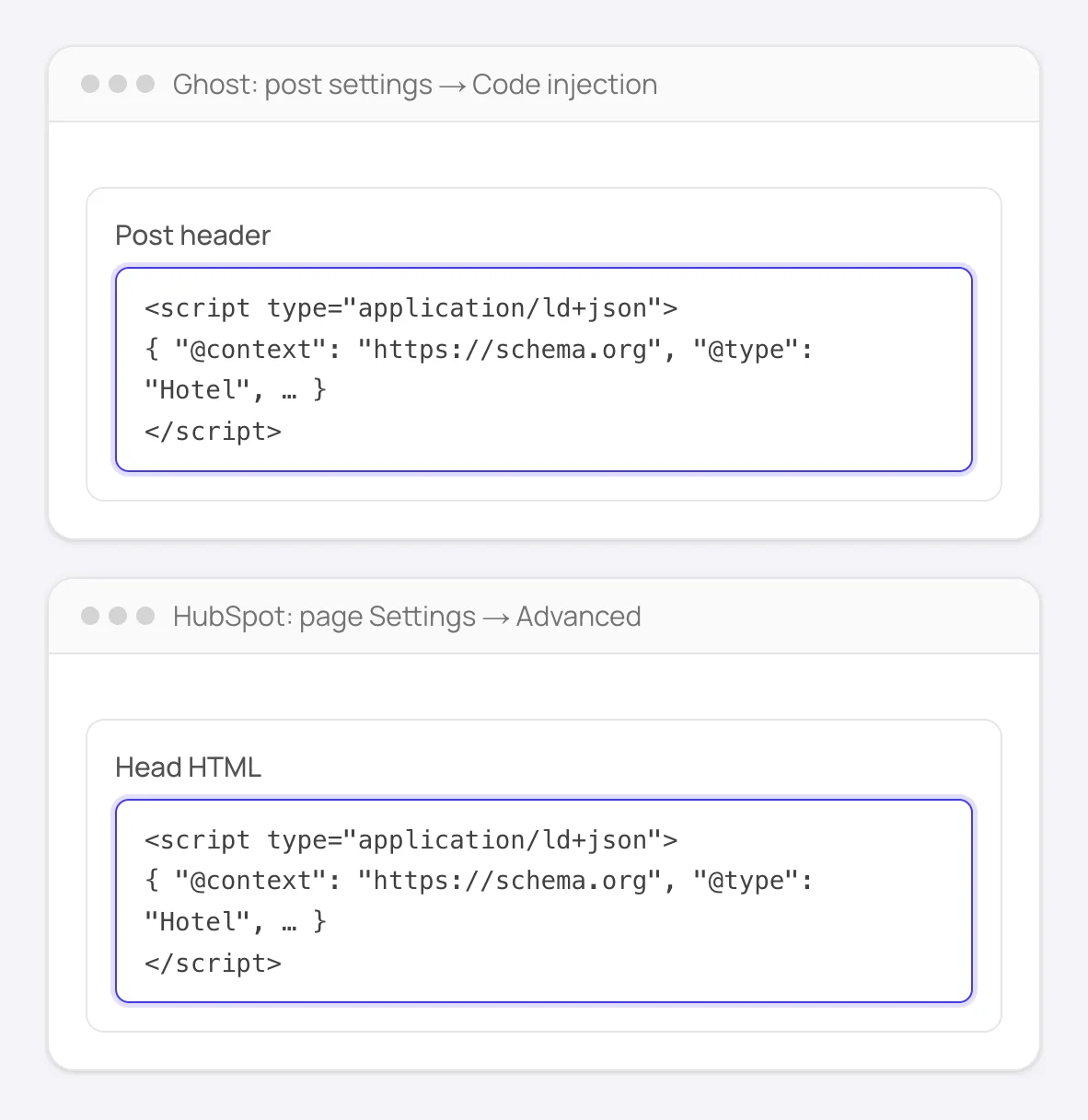
Ghost and HubSpot: the page's own header box. Other platforms have one under a similar name. - 3
Paste the code and actually publish
Save, then publish. Drafts and previews usually aren't crawled by search engines.
- 4
Confirm with view-source
Right-click the live page →
View Page Source(not the browser's DevTools Elements panel, which shows the page after JavaScript has already run), and search forapplication/ld+json. If your site renders its content in the browser (a single-page app without server rendering) and injects the schema the same way, it won't be there.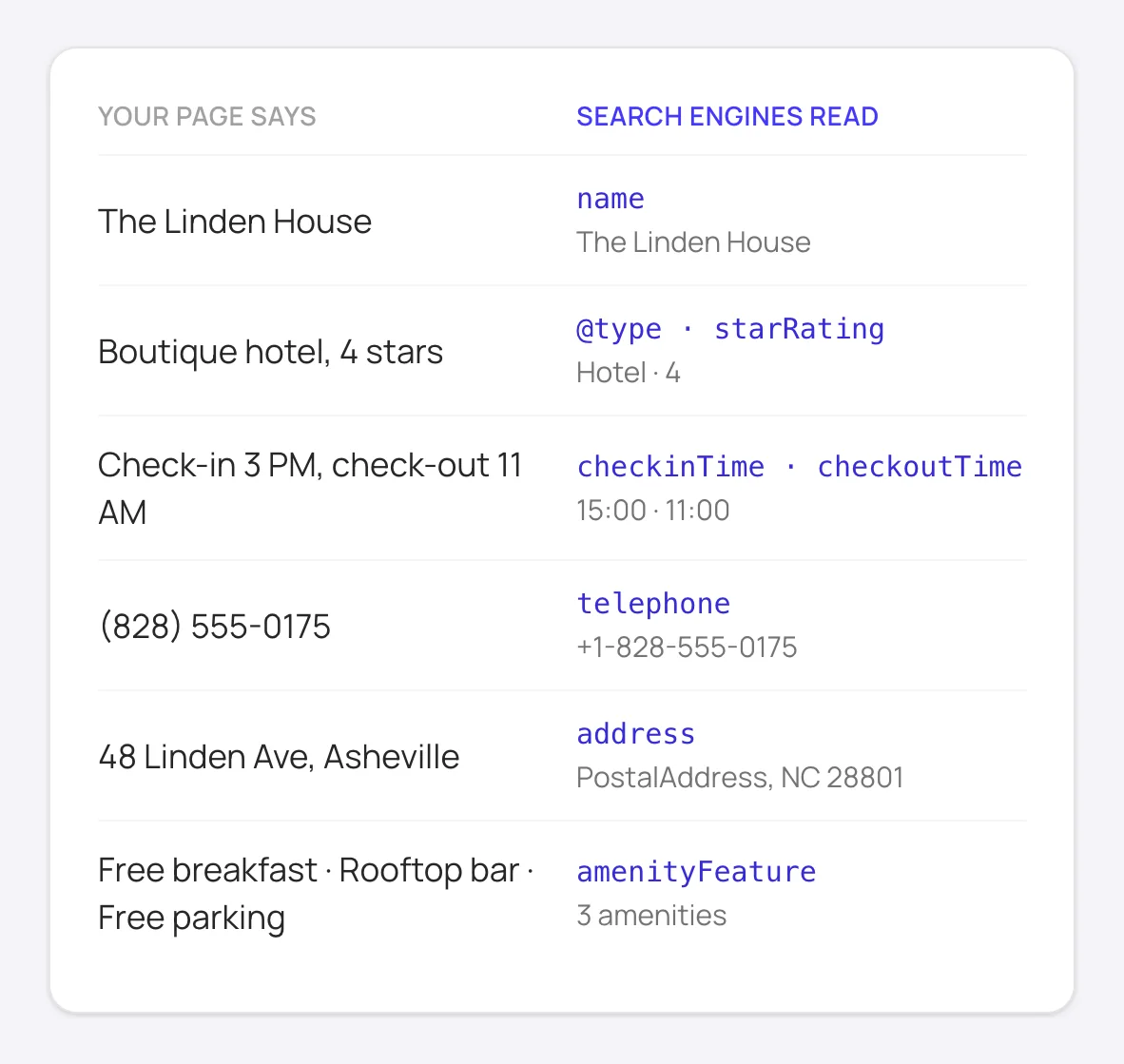
What the markup tells search engines and AI assistants: the same details your page shows, in a form they can read.
Good to know
If your site is a client-rendered single-page app, this is the one case where pasting a script tag genuinely isn't enough; you'd need server-side rendering or static generation for the schema, and the rest of your content, to exist in the initial HTML at all.
Test with Google's Rich Results Test after publishing. It fetches the live URL the way Google does, which is the most reliable way to confirm the schema actually made it through.
How to add schema to any website manually
Without FullSchema: what the same result takes by hand.
Whatever your site runs on, doing it yourself comes down to the same four jobs.
- 1. Find out what's already there
- Open a page, use
View Page Source, and search forapplication/ld+json. Many platforms add something on their own: Ghost writes article markup for posts, and Drupal sites often use the Schema.org Metatag module. Build on it instead of adding a second block for the same thing. - 2. Write the missing blocks by hand
- For each important page, pick the most specific schema.org type, check Google's documentation for the fields it needs, and use only details that are visible on the page. Paste it wherever your platform lets you add raw HTML to that page.
- 3. Validate the live URL
- Google's Rich Results Test shows whether a page qualifies for a rich result; the Schema Markup Validator checks all schema.org types. Test the published page, since previews and drafts often behave differently.
- 4. Keep it matching the page
- Hand-written markup is a snapshot. When prices, hours, services or contact details change, update the blocks on the affected pages, or they'll start contradicting what visitors see.
What people ask about Any custom site schema, answered
Collected from Reddit, the Any custom site community and SEO forums. Straight answers, including the cases where you don't need us.
JSON-LD, Microdata or RDFa: which should I use?
JSON-LD. Google recommends it. It lives in one script tag instead of attributes spread across your HTML, and it survives redesigns. Microdata from an old theme still works, but when you add new schema, add it as JSON-LD.
Head or body?
Either. Search engines read JSON-LD wherever it appears in the HTML. Put it where your platform lets you and where you'll find it again.
How many schema types can one page have?
One main entity (the thing the page is about) plus supporting ones like BreadcrumbList or Organization. What hurts is two blocks describing the same thing; Google picks one and it may be the thin one.
I added schema weeks ago and there's still no rich result.
Valid markup makes a page eligible, not guaranteed. Google also weighs page quality, and some types, like FAQ and HowTo, no longer get a rich result at all. Check Search Console's enhancements report for the page: if it's listed as valid with no errors, the markup did its job and the rest is up to Google.
Can I add the schema through Google Tag Manager?
It works, but the schema then exists only after JavaScript runs. Google renders pages later and less often than it crawls them, and many other crawlers and AI assistants don't run JavaScript at all. Put it in the HTML if your platform allows it; keep GTM as a last resort.
Does schema markup help with ChatGPT, Perplexity and AI search?
It helps them read the page unambiguously: which thing is the product, what the price is, which text is the answer to which question. No one publishes a guarantee, but structured pages get quoted more accurately, and the cost of adding it is one script tag.
Not sure what your Any custom site pages have today? The site report is free.
Check every page freeCommon questions about adding schema markup
My platform isn't listed here or in the other guides. Now what?
The mechanism is the same everywhere: find wherever your platform lets you inject raw HTML into a page's head or body, and paste the script tag there. If you can't find that setting, search "[your platform] custom code" or "code injection"; nearly every modern site builder has some version of it.
How do I know if my site is client-rendered?
View Page Source (not DevTools) on any page. If the content you actually see on screen is missing from that raw HTML, and only a placeholder or a bare <div id="root"> is there, your site renders on the client, and you'll need server-side rendering or static generation for schema, and SEO generally, to work properly.
Is there a way to check that it worked, regardless of platform?
Yes. Paste the live URL into Google's Rich Results Test. It shows exactly what schema Google's crawler could actually find on the page, independent of which platform built it.
Ready to generate Any custom site schema?
Paste your page's URL and FullSchema handles the rest. No dropdowns, nothing to fill in by hand.