
Schema markup validator
Check the schema markup on any page, or paste your JSON-LD. Every error and warning against Google's rich result rules and schema.org, in plain English, with what to change.
By Kadir Yaz · Updated
What you'll see
- Errors. What stops search engines reading the markup or keeps the page out of rich results.
- Warnings. Details worth tidying, like an empty field. Optional fields Google recommends are listed apart.
- What to change. Each problem in one plain sentence, with a guide when there's more to it.
What the validator checks
It reads every JSON-LD block on the page as one set, the way search engines do, and runs the same rules FullSchema uses on the schema it writes and on the sites it monitors.
Google's rich result rules
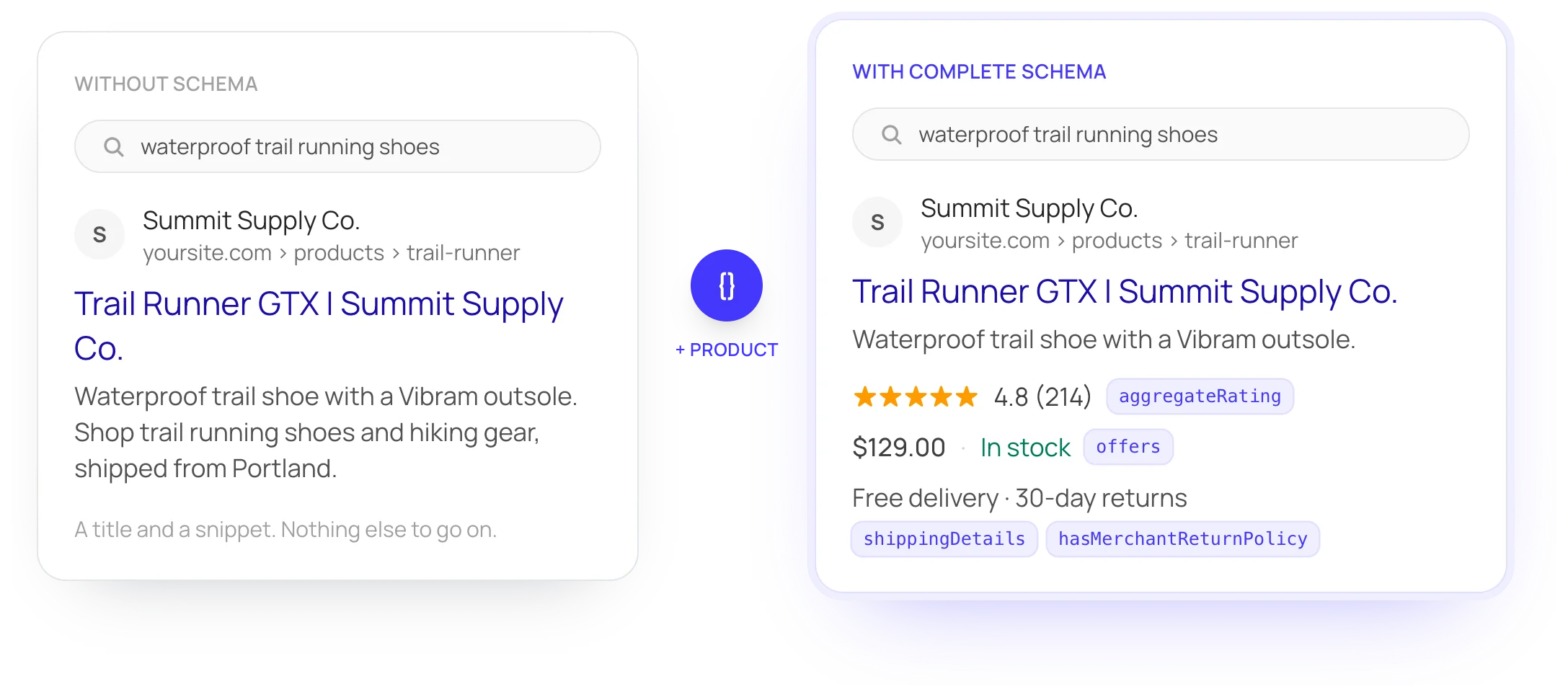
Fields Google requires for each rich result type, the ones it recommends, and the ones a result needs before Google will show it, such as a price and currency on a product offer.
The schema.org vocabulary
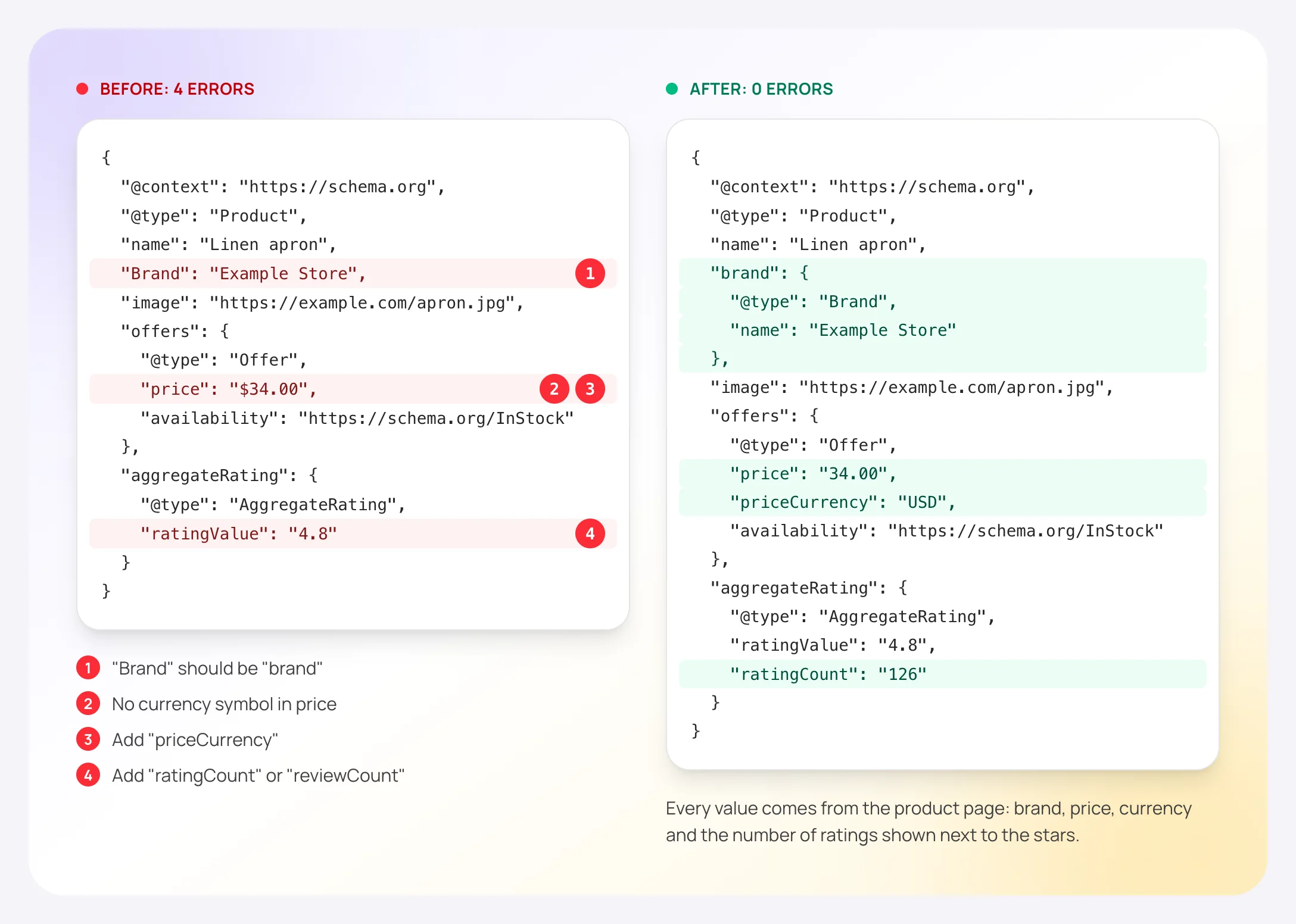
Types that don't exist, properties with the wrong capitalization ("Brand" instead of "brand"), properties used on a type that doesn't have them, and values with the wrong shape.
JSON syntax
A missing comma or quote breaks the whole block, and search engines skip all of it. The validator names the block and the line and column where it breaks.
The page around the markup
The same thing described twice in separate blocks, fields left empty, a noindex tag that keeps the page out of search, and redirects to another address.
Types with Google rules (26)
- AggregateRating
- Answer
- Article
- BreadcrumbList
- Course
- Dataset
- DiscussionForumPosting
- Event
- ItemList
- JobPosting
- LocalBusiness
- MerchantReturnPolicy
- Movie
- OfferShippingDetails
- Organization
- Product
- ProductGroup
- ProfilePage
- QAPage
- Question
- Recipe
- Review
- SoftwareApplication
- VideoObject
- WebApplication
- WebSite
Other schema.org types are checked against the vocabulary: real type, real properties, right kind of value.
The errors we see most
From the 243 business pages in our 2026 study, counted on the 206 that had JSON-LD.
| Error | Pages |
|---|---|
| A field Google requires is missing (address on a business, item URL in a breadcrumb, review count on a rating) | 41 of 206 |
| The JSON-LD block is broken JSON, so search engines skip all of it | 3 of 206 |
| A Product has no price, review or rating, which Google treats as invalid | 1 of 206 |
| An offer price is not a plain number or has no currency | 1 of 206 |
| A value has the wrong shape for schema.org (plain text where an object is expected) | 21 of 206 |
| A type that does not exist in schema.org (for example "Website" instead of "WebSite") | 9 of 206 |
This validator, Rich Results Test or Schema Markup Validator?
They answer different questions, and using two of them is normal.
This validator
Use it when you want every problem in plain English, with what to change, for any page or a snippet you're about to publish.
- Google's rich result rules and schema.org vocabulary in one pass
- Reads the HTML the server sends. Paste code for markup added by JavaScript
- Free, no sign-up
Google's Rich Results Test
Use it when you want to see which Google rich results the page can get and how they might look.
- Google's own tool. Tests a URL or a code snippet
- Uses the rendered page, so it sees markup added by JavaScript
- Covers the structured data features Google Search supports
Schema Markup Validator
Use it when you use schema.org types that Google doesn't turn into rich results and want them checked too.
- Run by schema.org
- Checks all schema.org-based structured data
- No Google feature-specific warnings
Schema validation questions
How do I check if my schema markup is correct?
Enter the page address above and press Test URL, or paste the JSON-LD in the Code tab and press Test code. Fix the errors first: they stop the markup from working or keep the page out of rich results. Then tidy the warnings. Optional fields are worth adding only when the page shows them. Then run the page through Google's Rich Results Test to see which results Google says it can show.
Why does the validator find no schema when my page has some?
It reads the HTML your server sends. Some apps and tag managers add schema with JavaScript after the page loads, and that isn't in the server's HTML. In our study, 10 of the 205 JSON-LD pages where we also saved the server HTML added it this way. Paste the code in the Code tab to check it. Google renders pages, so it can still read that markup. Many other crawlers and AI tools read the raw HTML only.
Does valid schema markup guarantee rich results?
No. Google says it doesn't guarantee that structured data will show up in search results, even when the markup is correct. The markup also has to describe what's visible on the page. Valid, complete markup makes a page eligible. Google decides when to show a rich result.
What's the difference between an error and a warning?
An error means search engines can't read part of the markup, or a field Google requires for that result type is missing or wrong. A warning is a detail worth tidying, like an empty field, an image address that isn't a full URL, or the same thing described in two blocks. Fields Google recommends but doesn't require are listed apart as optional fields and don't count as warnings. Pages can get rich results with warnings. Errors usually rule them out.
Can I check every page of my site at once?
Yes. The free site report checks every page in your sitemap and lists which ones have no schema, only basic schema, or schema with problems. It needs a free account, no card.
Is the validator free, and do you keep what I check?
It's free and needs no sign-up. We don't save the address or the code you check. It's read once to produce the result.