
Add schema markup to a GoDaddy website
Give Google and AI assistants your hours, phone, service area and services exactly as your site shows them. Every GoDaddy page has a box for it.
- No app, just the page's
Header HTMLbox - Paste, then Publish
- Works on Websites + Marketing and Airo sites
- LocalBusiness, Service, FAQ and more
Your page
HoverTap a detail to trace it
Licensed plumber · Tampa, FL
Harbor Plumbing
Leak repair · Water heaters · Drain cleaning
Hours
24 hours, 7 days
Contact
(813) 555-0117
4810 N Florida Ave, Tampa, FL 33603
FullSchema reads it and writes the schema search engines and AI read.
What search engines know
Plumber
- Business
- Harbor Plumbing
- Services
- Leak repair, Water heaters, Drain cleaning
- Hours
- Mo-Su 00:00-23:59
- Phone
- +1-813-555-0117
- Address
- 4810 N Florida Ave, Tampa, FL 33603
Plumber in Tampa I can call tonight?
Harbor Plumbing at 4810 N Florida Ave is open 24 hours, 7 days. Call (813) 555-0117 to book. They offer leak repair, water heaters, drain cleaning.
harborplumbingfl.com<!-- not the HTML section: it loads in a frame --><script type="application/ld+json">{"@context": "https://schema.org","@graph": [{"@type": "Plumber","@id": "https://harborplumbingfl.com/#plumber","name": "Harbor Plumbing","description": "Licensed plumbers for Tampa and St. Petersburg, open 24 hours.","url": "https://harborplumbingfl.com/","image": "https://harborplumbingfl.com/media/team.jpg","logo": "https://harborplumbingfl.com/media/logo.png","telephone": "+1-813-555-0117","email": "service@harborplumbingfl.com","priceRange": "$$","address": {"@type": "PostalAddress","streetAddress": "4810 N Florida Ave","addressLocality": "Tampa","addressRegion": "FL","postalCode": "33603","addressCountry": "US"},"openingHoursSpecification": [{"@type": "OpeningHoursSpecification","dayOfWeek": ["Monday","Tuesday","Wednesday","Thursday","Friday","Saturday","Sunday"],"opens": "00:00","closes": "23:59"}],"areaServed": [{ "@type": "City", "name": "Tampa" },{ "@type": "City", "name": "St. Petersburg" }],"hasOfferCatalog": {"@type": "OfferCatalog","name": "Plumbing services","itemListElement": [{"@type": "Offer","itemOffered": { "@type": "Service", "name": "Leak repair" }},{"@type": "Offer","itemOffered": { "@type": "Service", "name": "Water heaters" }},{"@type": "Offer","itemOffered": { "@type": "Service", "name": "Drain cleaning" }}]},"sameAs": ["https://www.facebook.com/harborplumbingtampa"]},{"@type": "WebSite","@id": "https://harborplumbingfl.com/#website","url": "https://harborplumbingfl.com/","name": "Harbor Plumbing","publisher": {"@id": "https://harborplumbingfl.com/#plumber"}},{"@type": "WebPage","@id": "https://harborplumbingfl.com/#webpage","url": "https://harborplumbingfl.com/","name": "Harbor Plumbing | 24-hour plumber in Tampa, FL","isPartOf": {"@id": "https://harborplumbingfl.com/#website"},"about": {"@id": "https://harborplumbingfl.com/#plumber"},"inLanguage": "en-US"}]}</script>Short answer
To add schema markup to a GoDaddy website, edit the site, open Pages, click Settings next to the page and choose SEO. Paste the JSON-LD block into Header HTML, then publish. Don't use the HTML section: it loads code in a frame, and search engines don't count it as part of your page.
- Where it goes
- Page Settings → SEO → Header HTML
- Works for
- Websites + Marketing and Airo sites
- Setup time
- ~3 minutes
Updated
How to add it
- 1
Generate the code
Paste the published page's URL into FullSchema. It reads the name, address, phone, hours and services the page shows.
Copygives you the block with its<script>tags for the Header HTML box. - 2
Go to the page's SEO panel
Edit your website, open
Pagesin the side panel, click theSettingsicon next to the page, and chooseSEO. - 3
Paste into Header HTML
Scroll to
Header HTMLand paste the block into the box. It only applies to this page. Skip theHTMLsection you can add to a page: it loads code in a frame, and search engines don't count it as part of your page.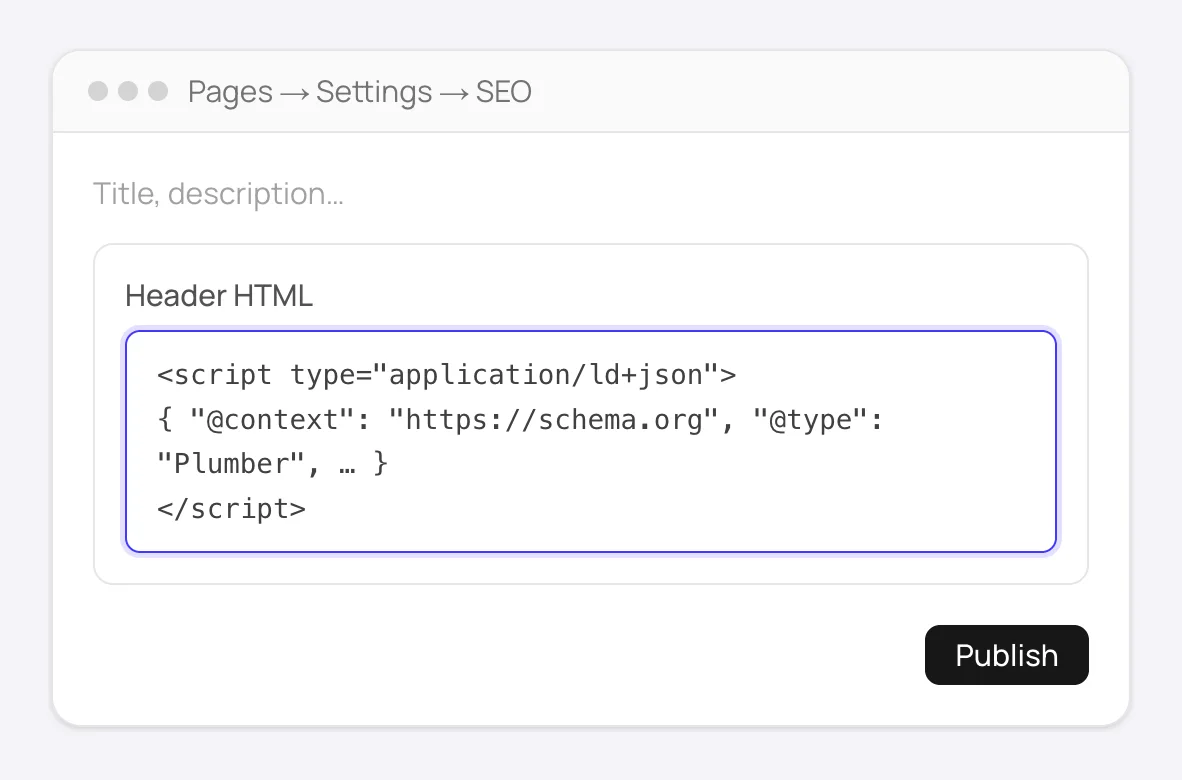
Pages → Settings → SEO: paste the block into Header HTML, then publish. - 4
Publish again
Changes in the builder stay in your draft until you click
Publish. The schema isn't live before that. - 5
Verify on the live page
Open the live page, right-click →
View Page Source, and search forapplication/ld+json. Google's Rich Results Test shows what Google reads from it.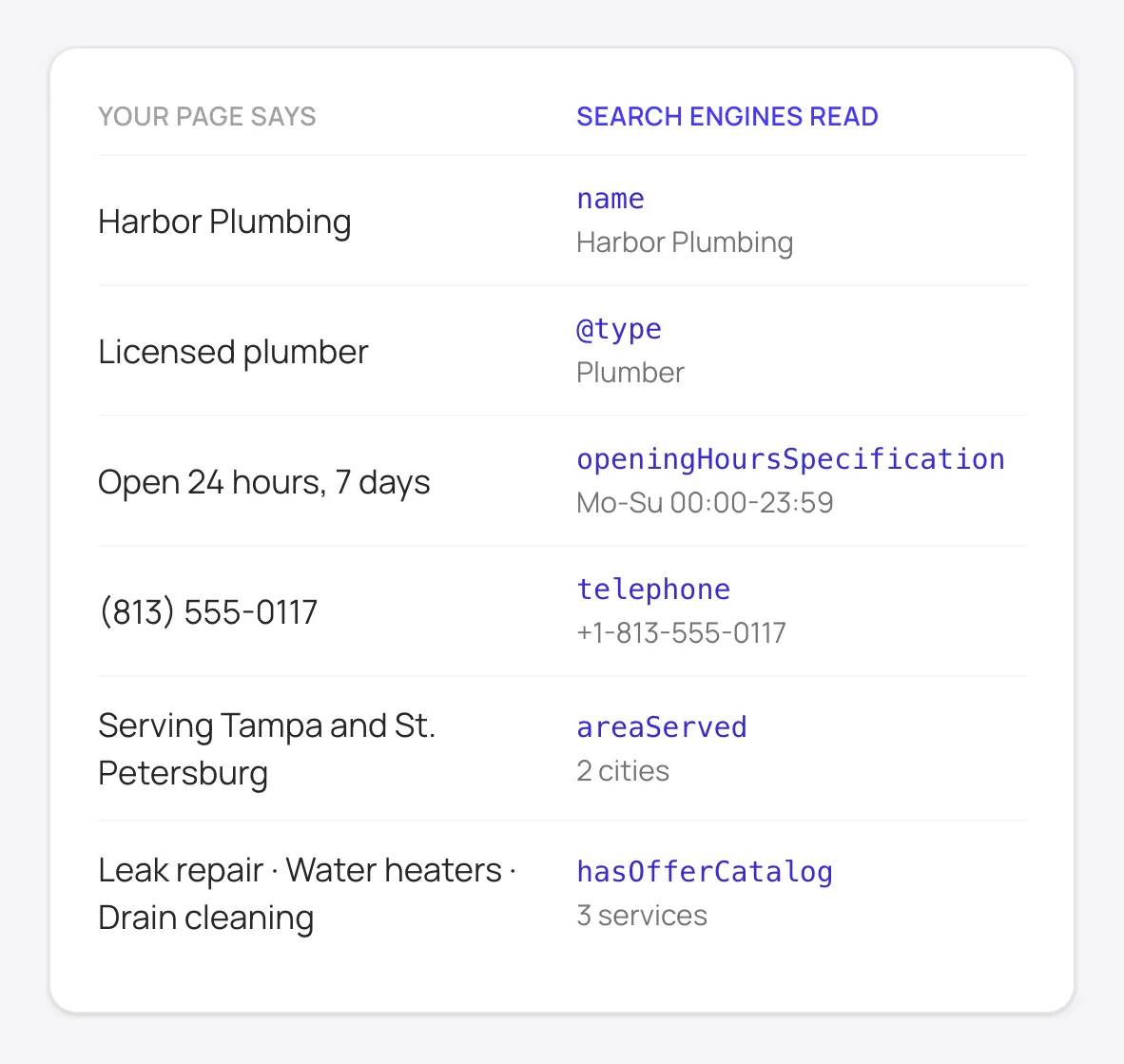
What the markup tells search engines and AI assistants: the same details your page shows, in a form they can read.
Good to know
Put your business details (Organization or LocalBusiness) on the home page's Header HTML. Search engines don't need them repeated on every page.
Each page has its own Header HTML box, so a new page doesn't inherit schema from another one. Generate and paste for each page that matters.
Not sure where to start? The free site report lists every page on your domain and shows which ones have no schema yet. Start with the home page and the pages that bring in customers: services, products, locations.
How to add schema to GoDaddy manually
Without FullSchema: what the same result takes by hand.
GoDaddy's builder has no schema settings to switch on, so doing it yourself means writing each block, one page at a time.
- 1. Decide what each page is about
- Before writing anything, list your important pages and the one thing each describes: the business on the home page, a service, a product, a location. That tells you which schema.org type each block needs, and it keeps you from putting the same block on every page.
- 2. Write the block by hand
- Look up the type on schema.org and the fields Google's documentation asks for, then fill them in with details the page actually shows: name, address, phone, hours, prices. Paste it into the page's
SEO → Header HTMLbox and publish. - 3. Validate the live page
- Check the published URL with the Rich Results Test. If the test finds nothing, the code probably went into an HTML section instead of Header HTML, or the site wasn't published after the change.
- 4. Keep it matching the page
- Every block is a copy of what the page says at the time you wrote it. When you change your phone number, hours or prices, update the Header HTML on each affected page.
What people ask about GoDaddy schema, answered
Collected from Reddit, the GoDaddy community and SEO forums. Straight answers, including the cases where you don't need us.
I added schema with the HTML section and Google doesn't find it.
The HTML section places its code in a frame, which search engines treat as a separate document, not part of your page. Move the code to the page's Settings → SEO → Header HTML box, remove the HTML section, and publish again.
Is there a way to add schema to all pages at once?
Page-specific schema (a service, a product, an FAQ) should only be on its own page anyway. For the business itself, the home page is enough. So in practice you paste once per page that matters, and the home page carries the business details.
I pasted the code but the live page doesn't have it.
The builder saves to a draft. Click Publish after every change, then check the live page with View Page Source. If you edited the site with Airo, the same step applies: nothing goes live until you publish.
Is GoDaddy's builder bad for SEO?
It covers the basics: page titles, descriptions and clean URLs. What it doesn't give you is schema beyond the minimum, which is the part that makes pages eligible for rich results and easier for AI assistants to quote. Adding a complete JSON-LD block per page closes most of that gap.
Should my site use LocalBusiness or Organization?
If customers come to a physical address (a shop, a clinic, a salon), a LocalBusiness type fits, ideally the specific one like Dentist or HairSalon. If you work online or at the customer's location, Organization is the honest choice. FullSchema picks the type from what the page shows, so you don't have to decide field by field.
How do I update the schema after I change the page?
Open the same SEO → Header HTML box, replace the old block with the new one, and publish. Don't keep both: two blocks describing the same page with different details make search engines pick one, and it may be the outdated one.
Not sure what your GoDaddy pages have today? The site report is free.
Check every page freeGoDaddy schema markup questions
Does this work on a site I built with Airo?
Yes. Airo builds your site in GoDaddy's website builder, so every page has the same SEO → Header HTML box.
I pasted the code, but I don't see anything in the preview. Did it work?
Nothing is supposed to show. JSON-LD sits in the page's head and has no visual part. To confirm it's there, publish and open the live page's source, or run the URL through Google's Rich Results Test.
I have one location. Which page gets the LocalBusiness block?
The home page. It's the page search engines treat as the business itself. A contact page that shows the same address can carry the same block, as long as the details match exactly.
Ready to generate GoDaddy schema?
Paste your page's URL and FullSchema handles the rest. No dropdowns, nothing to fill in by hand.