
Add schema markup to Wix
Give Google and AI assistants your hours, phone, address and services exactly as your page shows them. Every Wix page already has a field for it.
- No app, just the page's
Structured Data Markupfield - Paste, click Apply, publish
- Long block? Custom Code puts it on that page only
- LocalBusiness, Service, Product, Event and more
Your page
HoverTap a detail to trace it
Family dentist · Austin, TX
Brightside Dental
Cleanings · Invisalign · Whitening
Hours
Mon to Fri, 8 AM to 5 PM
Contact
(512) 555-0198
2104 S Lamar Blvd, Austin, TX 78704
FullSchema reads it and writes the schema search engines and AI read.
What search engines know
Dentist
- Business
- Brightside Dental
- Services
- Cleanings, Invisalign, Whitening
- Hours
- Mo-Fr 08:00-17:00
- Phone
- +1-512-555-0198
- Address
- 2104 S Lamar Blvd, Austin, TX 78704
Dentist near South Lamar open on a Friday?
Brightside Dental at 2104 S Lamar Blvd is open Mon to Fri, 8 AM to 5 PM. Call (512) 555-0198 to book. They offer cleanings, invisalign, whitening.
brightsidedental.com<!-- or Settings → Custom Code, for long blocks --><script type="application/ld+json">{"@context": "https://schema.org","@graph": [{"@type": "Dentist","@id": "https://brightsidedental.com/#dentist","name": "Brightside Dental","description": "Family dentist on South Lamar: cleanings, Invisalign and whitening.","url": "https://brightsidedental.com/","image": "https://brightsidedental.com/media/clinic-front.jpg","logo": "https://brightsidedental.com/media/logo.png","telephone": "+1-512-555-0198","email": "hello@brightsidedental.com","priceRange": "$$","address": {"@type": "PostalAddress","streetAddress": "2104 S Lamar Blvd","addressLocality": "Austin","addressRegion": "TX","postalCode": "78704","addressCountry": "US"},"openingHoursSpecification": [{"@type": "OpeningHoursSpecification","dayOfWeek": ["Monday","Tuesday","Wednesday","Thursday","Friday"],"opens": "08:00","closes": "17:00"}],"areaServed": { "@type": "City", "name": "Austin" },"isAcceptingNewPatients": true,"hasOfferCatalog": {"@type": "OfferCatalog","name": "Dental services","itemListElement": [{"@type": "Offer","itemOffered": { "@type": "Service", "name": "Cleanings" }},{"@type": "Offer","itemOffered": { "@type": "Service", "name": "Invisalign" }},{"@type": "Offer","itemOffered": { "@type": "Service", "name": "Whitening" }}]},"sameAs": ["https://www.facebook.com/brightsidedentalatx","https://www.instagram.com/brightsidedental"]},{"@type": "WebSite","@id": "https://brightsidedental.com/#website","url": "https://brightsidedental.com/","name": "Brightside Dental","publisher": {"@id": "https://brightsidedental.com/#dentist"}},{"@type": "WebPage","@id": "https://brightsidedental.com/#webpage","url": "https://brightsidedental.com/","name": "Brightside Dental | Family dentist in Austin, TX","isPartOf": {"@id": "https://brightsidedental.com/#website"},"about": {"@id": "https://brightsidedental.com/#dentist"},"inLanguage": "en-US"}]}</script>Short answer
To add schema markup to Wix, open the page's SEO settings, go to Advanced SEO, click + Add New Markup under Structured Data Markup, paste the JSON-LD block and click Apply. Each markup holds up to 7,000 characters; a longer block goes in Settings → Custom Code, set to that page only.
- Where it goes
- Advanced SEO → Structured Data Markup
- Size limit
- 7,000 characters per markup
- Setup time
- ~3 minutes
Updated
How to add it
- 1
Generate the code
Paste the published page's URL, on your connected domain or the free
wixsite.comaddress.Copygives you the block with its<script>tags, which is the format Wix's markup field expects. - 2
Find the Structured Data Markup field
In the editor, click
Pages & Menu, then theMore Actionsicon (⋯) next to the page, thenSEO basics. Switch to theAdvanced SEOtab and openStructured Data Markup. - 3
Add the markup
Click
+ Add New Markup, paste the block as is, and clickApply. Wix checks it on the spot and tells you if something is off. Each markup holds up to 7,000 characters.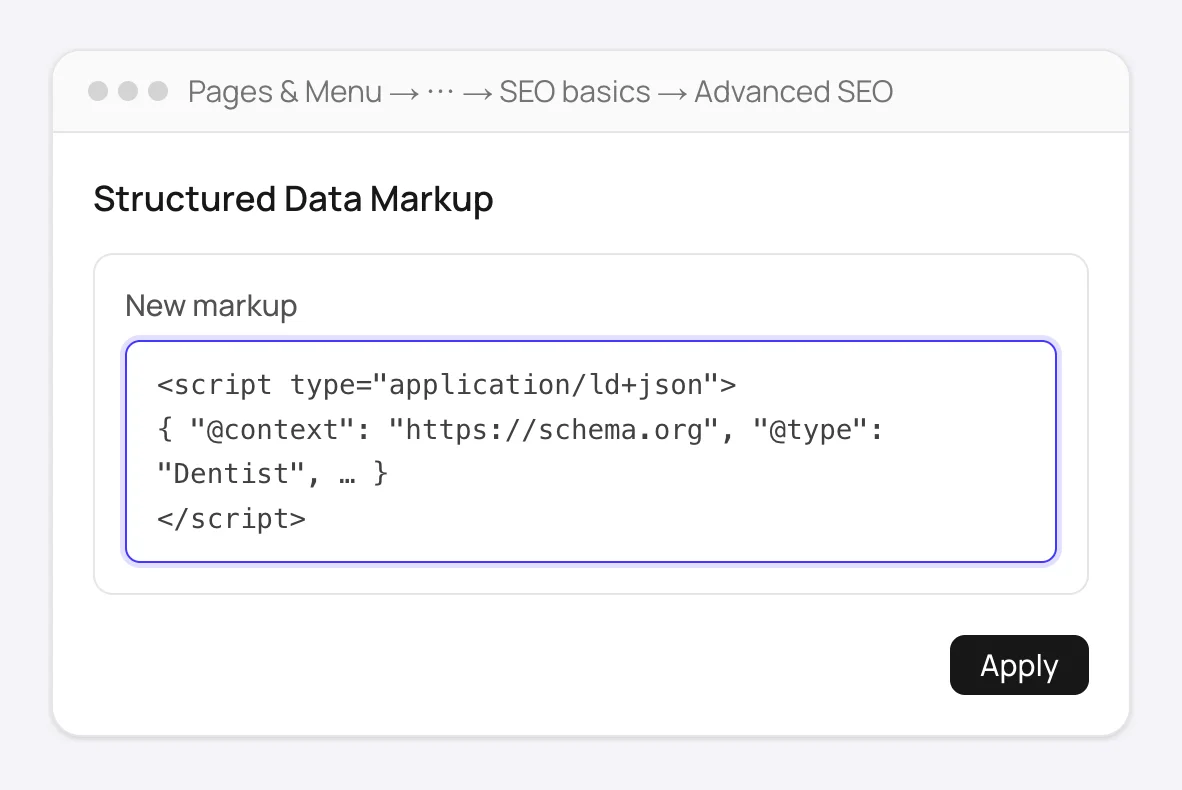
Advanced SEO → Structured Data Markup: paste the block as is and click Apply. - 4
If Wix says it's too long
Go to
Settings → Custom Code(under Development & integrations) and click+ Add Custom Code. Paste the block, name it after the page, chooseChoose specific pagesand pick the page, setPlace Code intoHead, and apply. Custom Code needs a Premium plan and a published site with a connected domain.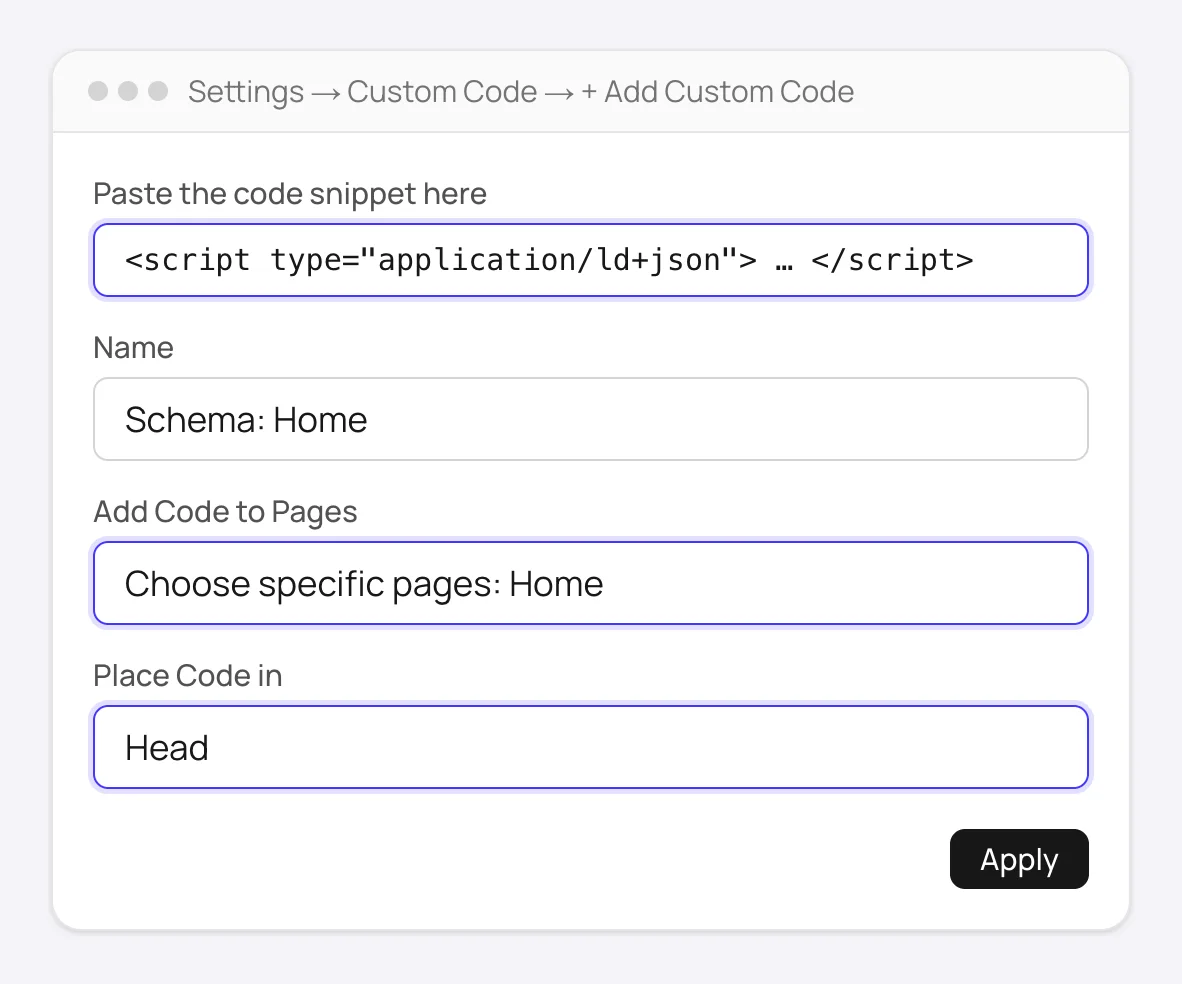
Settings → Custom Code: the same block, limited to one page and placed in the head. No length limit. - 5
Publish and verify
Publish the site, open the live page, and check with Google's Rich Results Test or
View Page Source→ search forapplication/ld+json.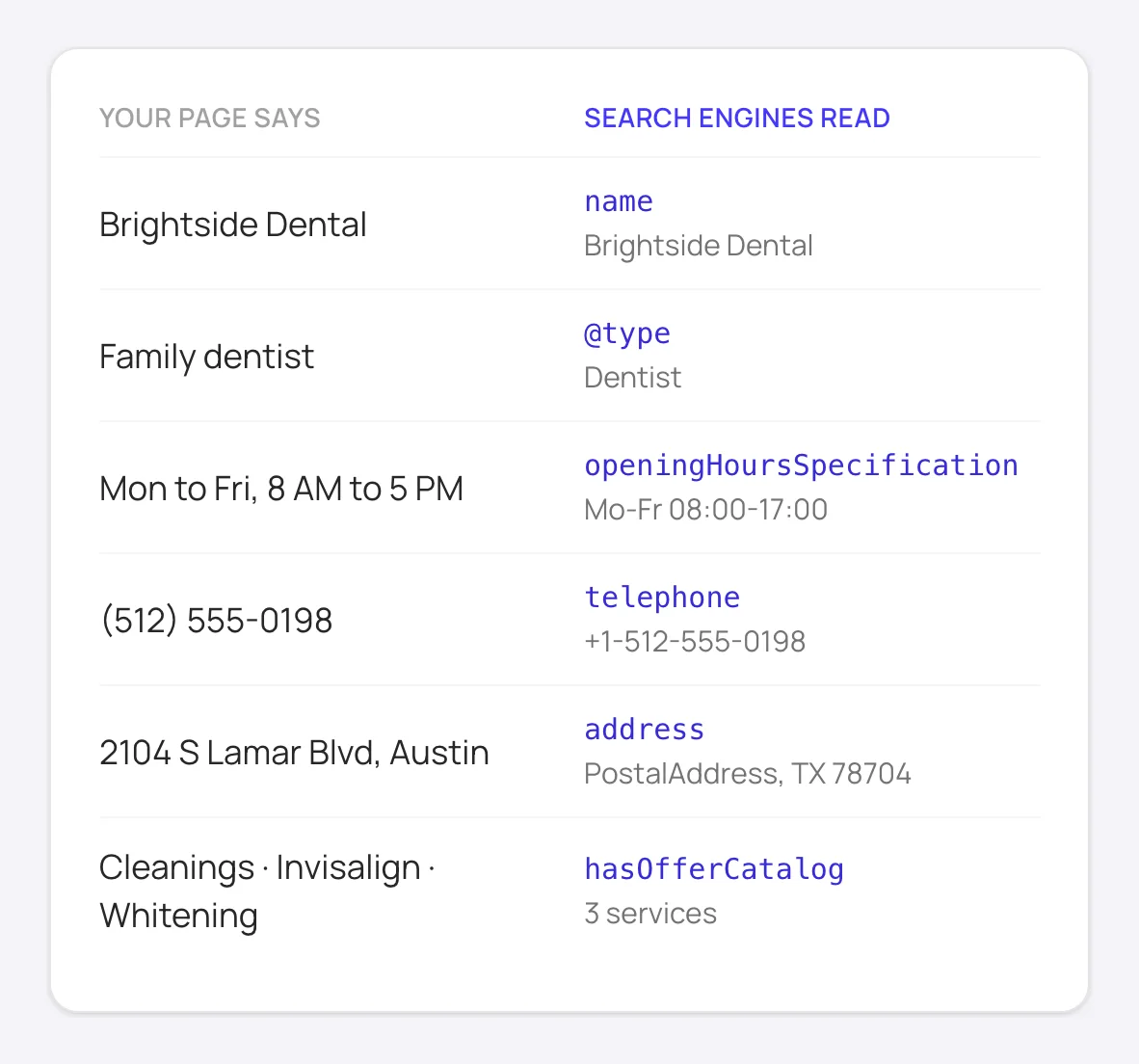
What the markup tells search engines and AI assistants: the same details your page shows, in a form they can read.
Good to know
Wix allows up to five markups per page. One FullSchema block covers the whole page, so you only ever need one slot.
Store product and blog post pages already carry Wix's preset markup. Look at what's listed under Structured Data Markup first, so the same product isn't described twice with different details.
How to add schema to Wix manually
Without FullSchema: what the same result takes by hand.
Wix gives you more to work with than most builders. Doing everything yourself comes down to four jobs per page.
- 1. Start from Wix's presets
- Wix adds preset markup to store products, blog posts and some app pages, and you can adjust the defaults per page type in
SEO Settings, with variables that fill in each item's values. Blog posts can also get markup that Wix's AI writes from the post. - 2. Write custom markup for the rest
- For service pages, locations, or anything without a preset, write a JSON-LD block by hand: the most specific schema.org type, the fields Google's documentation lists for it, and only details the page shows. It goes into the page's
Structured Data Markupfield, under 7,000 characters. - 3. Validate after publishing
- Wix checks the syntax when you click Apply, but not whether the page qualifies for a rich result. Run the published URL through the Rich Results Test, and make sure a preset and your own block don't describe the same thing twice.
- 4. Revisit it when the page changes
- Presets follow your content; hand-written markup doesn't. When prices, hours or services change, edit the markup in the page's SEO settings as well.
What people ask about Wix schema, answered
Collected from Reddit, the Wix community and SEO forums. Straight answers, including the cases where you don't need us.
Wix says my markup is invalid, but Google's test says it's fine.
Wix's own check is stricter than Google's. It wants the <script type="application/ld+json"> tags around the code, straight quotes, no HTML inside the JSON, and one script tag per markup. A block copied from FullSchema already meets all of that; problems usually come from code that went through a word processor or chat app on the way and picked up curly quotes.
My markup is over 7,000 characters. Do I have to cut it down?
No. Cutting it usually removes the parts that make a page eligible for rich results. Add it through Settings → Custom Code instead, placed in the head and limited to that one page. That route has no length limit.
Wix already adds structured data. Do I still need my own?
Wix's presets cover a few page types with the basic fields. Service pages, location pages, the home page's business details, FAQs on a regular page and anything built with sections usually get nothing. FullSchema's free site report shows, page by page, which ones have schema and which type it is, so you only add where something is missing.
Can I add schema to dynamic pages (CMS collection items)?
Dynamic items don't appear in the Pages menu one by one, so they don't get their own markup field. Wix handles them per page type under SEO Settings, with variables that fill in each item's values. Generate for one item page, use the result as the model for that page type, and swap the fixed values for Wix's variables.
Does Google see schema on a Wix site, or only the browser?
Wix renders pages on its servers, and both the markup field and Custom Code placed in the head end up in the HTML that crawlers receive. View Page Source on the live URL is the quick check: if application/ld+json is there, crawlers see it too.
Can I use Wix's AI-generated structured data instead?
Wix can write markup for blog posts from the post's text, and it's a fine starting point there. It doesn't cover service pages, location pages or the business details on your home page. Run the free site report to see which pages still have nothing, and generate for those.
Not sure what your Wix pages have today? The site report is free.
Check every page freeWix schema markup questions
How do I edit or remove markup I added?
Open the same place: the page's SEO basics → Advanced SEO → Structured Data Markup. Each markup you added is listed there and can be edited or deleted. Publish the site afterwards so the live page changes too.
Can I add one block to several pages at once?
For page types like store products or blog posts, use the defaults in SEO Settings, which fill in each item's values. For your business details, Settings → Custom Code can place one block on all pages or on the ones you choose.
Should I use the markup field or Custom Code?
Use the page's Structured Data Markup field when the block fits. It sits with the page's other SEO settings, so it's easy to find and update later. Use Custom Code only when the block is over the limit.
Ready to generate Wix schema?
Paste your page's URL and FullSchema handles the rest. No dropdowns, nothing to fill in by hand.