
Local business schema generator
Paste your homepage or location page. FullSchema reads the name, address, hours, phone and map already on it, picks the most specific business type, and gives you LocalBusiness JSON-LD that passes Google's checks.
- No form to fill in: the facts come from your page
- The right subtype,
PlumberorDentist, not a genericLocalBusiness - Phone with country code, hours in 24-hour time, country as a code
- Nothing added that your site doesn't say
Your page
HoverTap a detail to trace it
Plumber · Bristol
Harbourside Plumbing & Heating
Boiler servicing · Leak repairs · Bathroom fitting
Hours
Mon to Fri, 7:30 AM to 6 PM
Contact
0117 496 0321
Unit 4, Brunel Trade Park, Bristol BS2 0TA
FullSchema reads it and writes the schema search engines and AI read.
What search engines know
Plumber
- Business
- Harbourside Plumbing & Heating
- Services
- Boiler servicing, Leak repairs, Bathroom fitting
- Hours
- Mo-Fr 07:30-18:00
- Phone
- +441174960321
- Address
- Unit 4, Brunel Trade Park, Bristol BS2 0TA
Bristol plumber that opens before 8am?
Harbourside Plumbing & Heating at Unit 4, Brunel Trade Park is open Mon to Fri, 7:30 AM to 6 PM. Call 0117 496 0321 to book. They offer boiler servicing, leak repairs, bathroom fitting.
harboursideplumbing.co.ukapplication/ld+json
{
  "@context": "https://schema.org",
  "@graph": [
    {
      "@type": "WebPage",
      "@id": "https://harboursideplumbing.co.uk/#webpage",
      "url": "https://harboursideplumbing.co.uk/",
      "name": "Harbourside Plumbing & Heating | Plumbers in Bristol",
      "inLanguage": "en-GB",
      "about": {
        "@id": "https://harboursideplumbing.co.uk/#business"
      }
    },
    {
      "@type": "Plumber",
      "@id": "https://harboursideplumbing.co.uk/#business",
      "name": "Harbourside Plumbing & Heating",
      "url": "https://harboursideplumbing.co.uk/",
      "logo": "https://harboursideplumbing.co.uk/images/logo.png",
      "image": "https://harboursideplumbing.co.uk/images/team-and-van.jpg",
      "telephone": "+441174960321",
      "email": "hello@harboursideplumbing.co.uk",
      "address": {
        "@type": "PostalAddress",
        "streetAddress": "Unit 4, Brunel Trade Park, Feeder Road",
        "addressLocality": "Bristol",
        "postalCode": "BS2 0TA",
        "addressCountry": "GB"
      },
      "geo": {
        "@type": "GeoCoordinates",
        "latitude": 51.44876,
        "longitude": -2.57412
      },
      "hasMap": "https://www.google.com/maps/search/?api=1&query=51.44876,-2.57412",
      "openingHoursSpecification": [
        {
          "@type": "OpeningHoursSpecification",
          "dayOfWeek": [
            "https://schema.org/Monday",
            "https://schema.org/Tuesday",
            "https://schema.org/Wednesday",
            "https://schema.org/Thursday",
            "https://schema.org/Friday"
          ],
          "opens": "07:30",
          "closes": "18:00"
        },
        {
          "@type": "OpeningHoursSpecification",
          "dayOfWeek": "https://schema.org/Saturday",
          "opens": "08:00",
          "closes": "13:00"
        }
      ],
      "contactPoint": {
        "@type": "ContactPoint",
        "contactType": "emergency",
        "telephone": "+441174960999",
        "hoursAvailable": {
          "@type": "OpeningHoursSpecification",
          "dayOfWeek": [
            "https://schema.org/Monday",
            "https://schema.org/Tuesday",
            "https://schema.org/Wednesday",
            "https://schema.org/Thursday",
            "https://schema.org/Friday",
            "https://schema.org/Saturday",
            "https://schema.org/Sunday"
          ],
          "opens": "00:00",
          "closes": "23:59"
        }
      },
      "areaServed": [
        {
          "@type": "AdministrativeArea",
          "name": "Bristol"
        },
        {
          "@type": "AdministrativeArea",
          "name": "Bath"
        },
        {
          "@type": "AdministrativeArea",
          "name": "Keynsham"
        },
        {
          "@type": "AdministrativeArea",
          "name": "Portishead"
        }
      ],
      "knowsAbout": [
        "Boiler installation",
        "Boiler servicing",
        "Leak repairs",
        "Bathroom fitting"
      ],
      "sameAs": [
        "https://www.facebook.com/harboursideplumbing"
      ]
    }
  ]
}
Short answer
LocalBusiness schema is a JSON-LD block that tells search engines and AI assistants which business a page belongs to: its exact name, street address, phone, opening hours and location. Google requires only name and address, and recommends hours, phone, URL and coordinates. Use the most specific type that is true for you (Dentist, Bakery, Plumber), put the full block on your homepage or location page, and copy every value from what the page shows.
- Google requires
nameandaddress- Business types
- 150 in schema.org
- Cost here
- 2 pages free, then $5
Updated
What LocalBusiness schema does, and what it doesn't
What it does
- Tells Google which business the site belongs to, so the address, phone and hours on your site and in your Business Profile line up as one entity.
- Gives AI assistants exact facts to quote when someone asks whether you're open on Sunday or where you are.
- Keeps two similarly named businesses in the same town apart, each with its own address and coordinates.
What it doesn't
- It doesn't put you in the map pack. That comes from your Google Business Profile, not from your website code.
- It doesn't create a special result on its own. Google has no star or card for a business's own LocalBusiness block.
- It doesn't fix wrong data. If the hours on your page are old, the schema repeats the old hours.
LocalBusiness properties: what Google reads and what to put
Required and recommended status comes from Google's LocalBusiness documentation. The notes, and the last few properties Google doesn't list, are ours.
name
Required by GoogleYour trading name exactly as customers see it on signs and in your Business Profile. No keywords, no city added unless it's part of the name.
FullSchema: Taken from the page's own name for the business. A registered company name in the footer (Ltd, GmbH, LLC) goes into legalName separately.
address
Required by GoogleA PostalAddress split into streetAddress, addressLocality, addressRegion where used, postalCode and a two-letter addressCountry. The place customers visit.
FullSchema: Split into parts from the page, or from the site's own contact page if the page has none. Country names in any language become codes (Belgique → BE).
telephone
RecommendedThe main customer number with country code: +44 117 496 0321. Without it, 0117 496 0321 leaves Google guessing the country.
FullSchema: Converted to international format using the country of the address, however the page writes it.
url
RecommendedThe page for this exact location: the homepage for one location, the branch page for several.
FullSchema: The location's own page when the site links to one, otherwise the page you generated for.
openingHoursSpecification
RecommendedOne entry per group of days with the same hours: dayOfWeek, opens, closes in 24-hour time. Patterns for split, 24-hour and holiday hours are below.
FullSchema: Written only when the page states days and times. Phone-line hours go to contactPoint, and a single "open today" box is never turned into a week.
geo
Recommendedlatitude and longitude with at least five decimal places, from your own map pin rather than a postcode lookup.
FullSchema: Copied from a map embedded or linked on the page, never looked up. If the map and the written address disagree, it's left out.
Show 10 more propertiesShow fewer propertiespriceRange, menu, servesCuisine, department, aggregateRating, review, image, areaServed, sameAs, contactPoint
priceRange
RecommendedOptional: $$ or a short range like £60 to £120, under 100 characters or Google ignores it.
FullSchema: Left out. A guessed $$ is worse than none.
menu
RecommendedFood businesses: the full URL of the menu page.
FullSchema: Written as hasMenu, schema.org's current name for the same property.
servesCuisine
RecommendedFood businesses: the cuisine in plain words, like Mediterranean.
FullSchema: Added only when the page names the cuisine.
department
RecommendedA business inside another at the same address, like a pharmacy counter in a supermarket.
FullSchema: Branches in other places are not departments; they get their own nodes linked by parentOrganization.
aggregateRating
RecommendedOnly for sites that review other businesses. Your own rating on your own site is a self-serving review and Google ignores it.
FullSchema: Never added to your own business. A star widget on the page stays on the page.
review
RecommendedSame rule as ratings: only for sites reviewing other businesses.
FullSchema: Not written for the business's own node.
image
Not on Google's listDropped from Google's list but still in every Google example. A real photo of the place or team.
FullSchema: From the page; the logo is never reused as the image.
areaServed
Not on Google's listTowns or regions you cover, by name. Matters most when you go to the customer.
FullSchema: From lines like "We cover Bristol, Bath and Keynsham".
sameAs
Not on Google's listYour own profiles: Facebook, Instagram, LinkedIn, Yelp.
FullSchema: Own profiles only; share buttons and the web agency's credit link are filtered out.
contactPoint
Not on Google's listA line with its own hours, like a 24/7 emergency number.
FullSchema: Phone-line hours shown next to a number land here.
Which LocalBusiness type to use
schema.org has 150 types under LocalBusiness, from Bakery to TireShop. Google reads them all the same way for the fields above, so the type is about being precise, not unlocking a feature.
Pick the most specific type that is true
A dental practice is Dentist, not MedicalBusiness. If nothing fits, go one level up: a window cleaner has no type, so HomeAndConstructionBusiness is the honest choice.
Two types are fine when both are true
["Bakery", "CafeOrCoffeeShop"] suits a bakery with tables. Don't stack types for services you only sometimes offer.
Skip the two deprecated ones
schema.org retired ProfessionalService (confused with Service) and Attorney (use LegalService). The finder marks both.
Online-only is not local
If customers never visit, use Organization with a plain postal address. LocalBusiness says "come here".
Common picks. Search all 150 types.
RestaurantLocalBusiness › FoodEstablishment › Restaurant
A restaurant.
DentistLocalBusiness › Dentist
A dentist.
PlumberLocalBusiness › HomeAndConstructionBusiness › Plumber
A plumbing service.
HairSalonLocalBusiness › HealthAndBeautyBusiness › HairSalon
A hair salon.
AutoRepairLocalBusiness › AutomotiveBusiness › AutoRepair
Car repair business.
LegalServiceLocalBusiness › LegalService
A LegalService is a business that provides legally-oriented services, advice and representation, e.g. law firms.
RealEstateAgentLocalBusiness › RealEstateAgent
A real-estate agent.
HotelLocalBusiness › LodgingBusiness › Hotel
A hotel is an establishment that provides lodging paid on a short-term basis.
MedicalClinicLocalBusiness › MedicalBusiness › MedicalClinic
A facility, often associated with a hospital or medical school, that is devoted to the specific diagnosis and/or healthcare.
StoreLocalBusiness › Store
A retail good store.
Types and descriptions from the schema.org vocabulary FullSchema validates against.
Local business schema example (JSON-LD)
A Bristol plumbing firm with a trade unit, weekday and Saturday hours, a separate 24/7 emergency line and four towns it covers. Below is its homepage, the JSON-LD that describes it in the shape FullSchema produces, and the decisions in between.
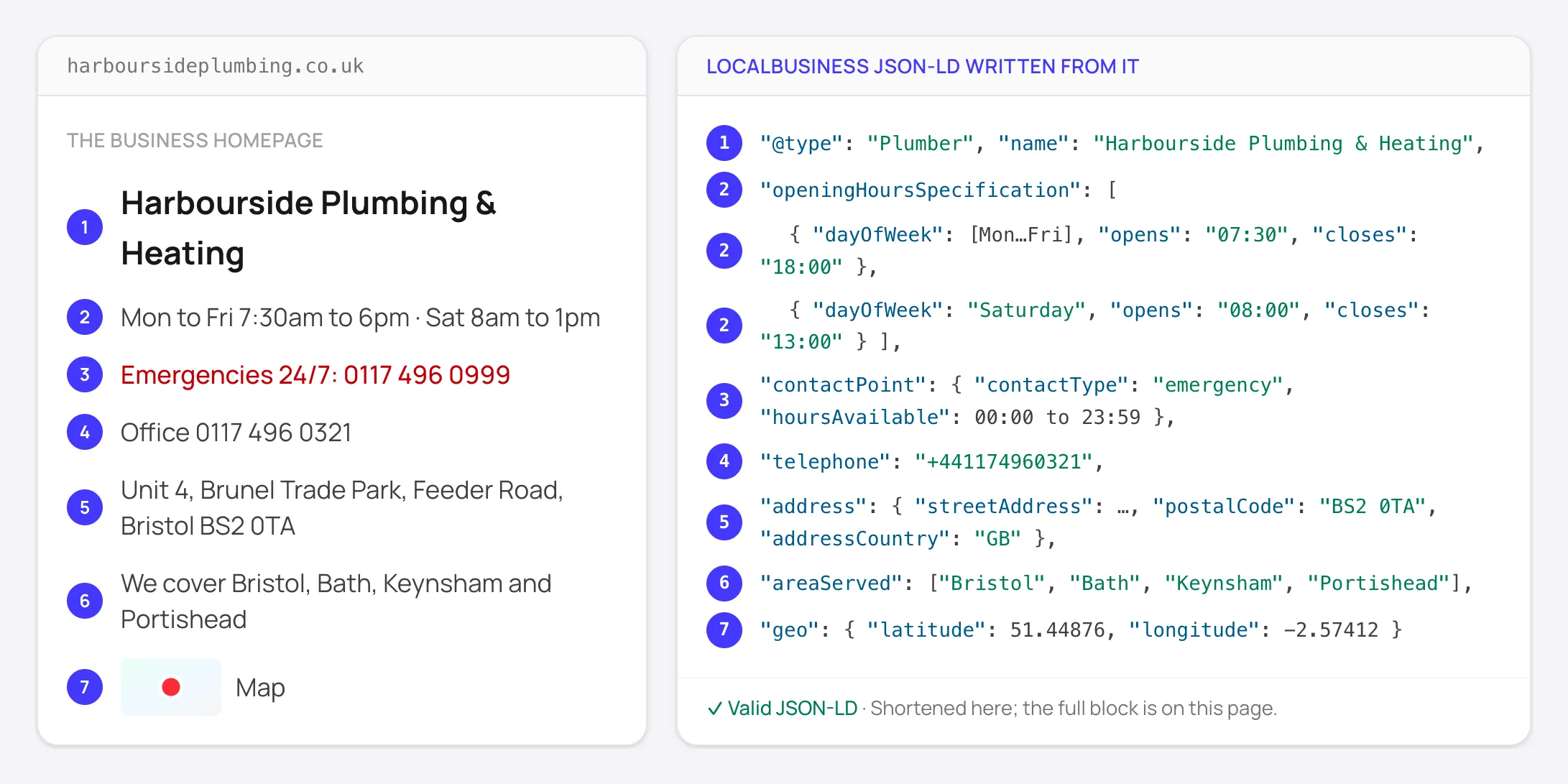
0117 496 0321
→ +441174960321
Country code added from the UK address.
Mon to Fri 7:30am to 6pm
→ Monday to Friday, 07:30 to 18:00
One entry for five days with the same hours.
Emergencies 24/7
→ contactPoint, 00:00 to 23:59
The phone line runs 24/7, the unit doesn't. In opening hours it would show the business as always open.
Embedded map
→ geo: 51.44876, -2.57412
From the map on the page, five decimals, no lookup.
The complete block
schema.html · Ready to paste as is. The script tag is included.
<script type="application/ld+json">
{
  "@context": "https://schema.org",
  "@graph": [
    {
      "@type": "WebPage",
      "@id": "https://harboursideplumbing.co.uk/#webpage",
      "url": "https://harboursideplumbing.co.uk/",
      "name": "Harbourside Plumbing & Heating | Plumbers in Bristol",
      "inLanguage": "en-GB",
      "about": {
        "@id": "https://harboursideplumbing.co.uk/#business"
      }
    },
    {
      "@type": "Plumber",
      "@id": "https://harboursideplumbing.co.uk/#business",
      "name": "Harbourside Plumbing & Heating",
      "url": "https://harboursideplumbing.co.uk/",
      "logo": "https://harboursideplumbing.co.uk/images/logo.png",
      "image": "https://harboursideplumbing.co.uk/images/team-and-van.jpg",
      "telephone": "+441174960321",
      "email": "hello@harboursideplumbing.co.uk",
      "address": {
        "@type": "PostalAddress",
        "streetAddress": "Unit 4, Brunel Trade Park, Feeder Road",
        "addressLocality": "Bristol",
        "postalCode": "BS2 0TA",
        "addressCountry": "GB"
      },
      "geo": {
        "@type": "GeoCoordinates",
        "latitude": 51.44876,
        "longitude": -2.57412
      },
      "hasMap": "https://www.google.com/maps/search/?api=1&query=51.44876,-2.57412",
      "openingHoursSpecification": [
        {
          "@type": "OpeningHoursSpecification",
          "dayOfWeek": [
            "https://schema.org/Monday",
            "https://schema.org/Tuesday",
            "https://schema.org/Wednesday",
            "https://schema.org/Thursday",
            "https://schema.org/Friday"
          ],
          "opens": "07:30",
          "closes": "18:00"
        },
        {
          "@type": "OpeningHoursSpecification",
          "dayOfWeek": "https://schema.org/Saturday",
          "opens": "08:00",
          "closes": "13:00"
        }
      ],
      "contactPoint": {
        "@type": "ContactPoint",
        "contactType": "emergency",
        "telephone": "+441174960999",
        "hoursAvailable": {
          "@type": "OpeningHoursSpecification",
          "dayOfWeek": [
            "https://schema.org/Monday",
            "https://schema.org/Tuesday",
            "https://schema.org/Wednesday",
            "https://schema.org/Thursday",
            "https://schema.org/Friday",
            "https://schema.org/Saturday",
            "https://schema.org/Sunday"
          ],
          "opens": "00:00",
          "closes": "23:59"
        }
      },
      "areaServed": [
        {
          "@type": "AdministrativeArea",
          "name": "Bristol"
        },
        {
          "@type": "AdministrativeArea",
          "name": "Bath"
        },
        {
          "@type": "AdministrativeArea",
          "name": "Keynsham"
        },
        {
          "@type": "AdministrativeArea",
          "name": "Portishead"
        }
      ],
      "knowsAbout": [
        "Boiler installation",
        "Boiler servicing",
        "Leak repairs",
        "Bathroom fitting"
      ],
      "sameAs": [
        "https://www.facebook.com/harboursideplumbing"
      ]
    }
  ]
}
</script>Opening hours schema for hours that don't fit one line
Hours break more LocalBusiness blocks than any other field. These are the shapes that come up, in the form Google documents.
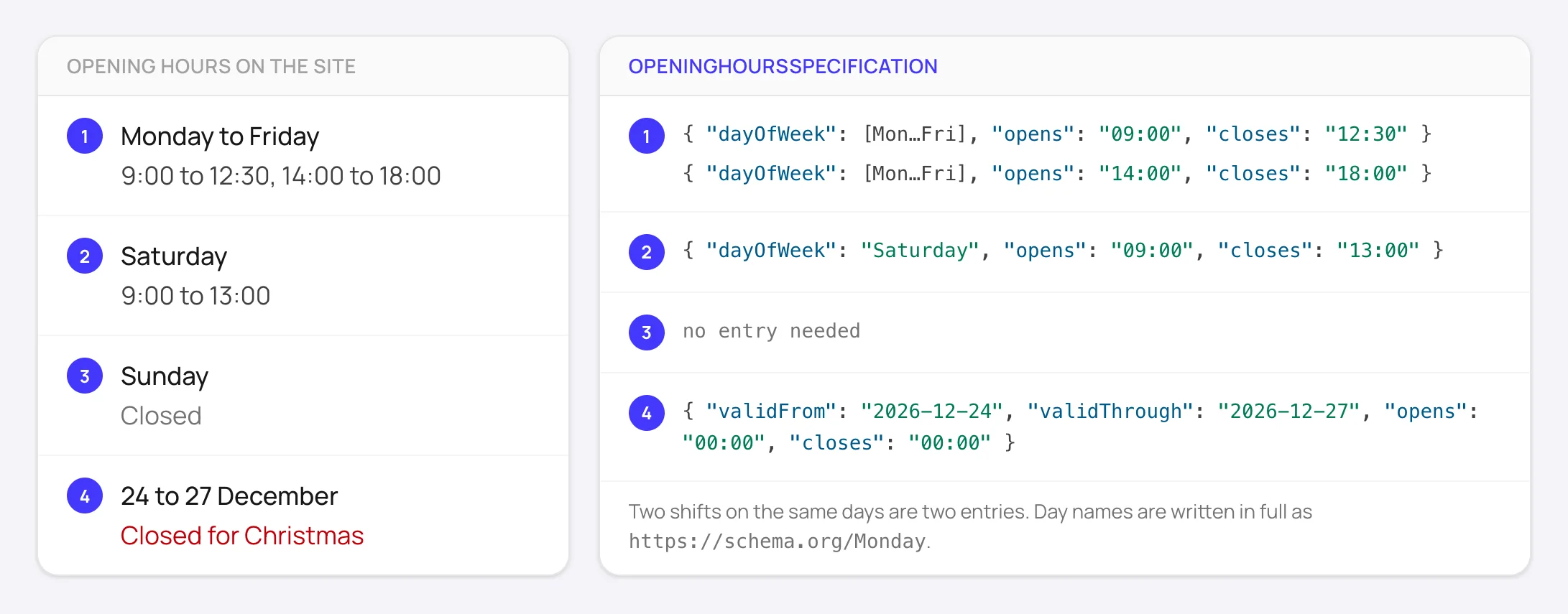
Closed for lunch
Two entries for the same days. A single 09:00 to 18:00 sends customers to a locked door at 1pm.
[
  {
    "@type": "OpeningHoursSpecification",
    "dayOfWeek": [
      "https://schema.org/Monday",
      "https://schema.org/Tuesday",
      "https://schema.org/Wednesday",
      "https://schema.org/Thursday",
      "https://schema.org/Friday"
    ],
    "opens": "09:00",
    "closes": "12:30"
  },
  {
    "@type": "OpeningHoursSpecification",
    "dayOfWeek": [
      "https://schema.org/Monday",
      "https://schema.org/Tuesday",
      "https://schema.org/Wednesday",
      "https://schema.org/Thursday",
      "https://schema.org/Friday"
    ],
    "opens": "14:00",
    "closes": "18:00"
  }
]
Open 24 hours
00:00 to 23:59 on every day it applies to. One entry covers the week.
{
  "@type": "OpeningHoursSpecification",
  "dayOfWeek": [
    "https://schema.org/Monday",
    "https://schema.org/Tuesday",
    "https://schema.org/Wednesday",
    "https://schema.org/Thursday",
    "https://schema.org/Friday",
    "https://schema.org/Saturday",
    "https://schema.org/Sunday"
  ],
  "opens": "00:00",
  "closes": "23:59"
}
Open past midnight
Keep the night on the day it starts: Saturday 6pm to 2am is one Saturday entry closing at 02:00.
{
  "@type": "OpeningHoursSpecification",
  "dayOfWeek": "https://schema.org/Saturday",
  "opens": "18:00",
  "closes": "02:00"
}
Closed on a day
Usually just leave the day out. To close a day another entry would cover, set both times to 00:00.
{
  "@type": "OpeningHoursSpecification",
  "dayOfWeek": "https://schema.org/Sunday",
  "opens": "00:00",
  "closes": "00:00"
}
Holiday or seasonal closure
An extra entry with validFrom and validThrough (YYYY-MM-DD) and both times at 00:00. Regular entries stay as they are.
{
  "@type": "OpeningHoursSpecification",
  "opens": "00:00",
  "closes": "00:00",
  "validFrom": "2026-12-24",
  "validThrough": "2026-12-27"
}
By appointment only
Write no opening hours. A made-up 09:00 to 17:00 tells people they can walk in.
{
  "//": "no openingHoursSpecification at all"
}Common local business schema mistakes
Each of these came up while checking schema on real small-business sites. Most stay invisible until a customer turns up at the wrong time.
- 1
Stars on your own business
Copying your Google rating into
aggregateRatingon your own site is a self-serving review. It won't show stars and can get the block ignored. Keep the review widget on the page, not in the schema. - 2
Coordinates from somewhere else
We've seen a page whose written address was the new unit while the map link beside it still opened the old one. If the map and the address disagree, leave
geoout until the map is fixed. - 3
One day turned into a week
Branch cards showing "Open today 9 to 5" look like hours, but written as a schedule they make every other day read as closed.
- 4
Phone-line hours as opening hours
"Lines open Mon to Fri 9 to 5" next to a number describes the phone, not the door. It belongs in
contactPoint.hoursAvailable. - 5
Every branch in one block
One LocalBusiness with three addresses describes no real place. Each branch is its own node, ideally on its own page, linked to the brand with
parentOrganization. - 6
The business described twice
A theme writes a LocalBusiness, an SEO plugin writes an Organization with a different spelling, and search engines see two entities. Make them agree on the name, address and phone, and link them by
@idwhere you can.
When your business doesn't fit the simple case
You go to the customer and don't publish an address
Google requires an address for LocalBusiness, so without one the block isn't eligible for its features. Describe where you work with areaServed. Showing just your town and region on the site is often enough to make the address usable.
Several branches
Each branch gets its own page and block with its own address, phone, hours and map. A brand Organization with the logo and social profiles sits above them, and each branch points to it with parentOrganization.
A business inside another
A pharmacy inside a supermarket or a café inside a bookshop is a department of the main business: same address, its own name and hours.
Restaurants and cafés
Add hasMenu with the menu page URL, servesCuisine, and acceptsReservations (true or the booking page URL). Google's restaurant carousel is limited to a small set of providers.
How FullSchema builds it
Paste a URL; about a minute later you have the block, already checked.
- 1
Reads the page a visitor sees
Map embed, footer and contact block included. If the page has no phone, address or social links, FullSchema checks the site's own contact page, at no extra cost.
- 2
Picks the type from the content
The most specific type the page supports. A site about check-ups and root canals becomes
Dentistwithout you choosing. - 3
Copies, never looks up
No geocoding, no Business Profile import, no guessing. Phones become international, countries become codes, hours become 24-hour time.
- 4
Checks it before you see it
Against the schema.org vocabulary and Google's rules. With Yoast or Rank Math on WordPress, the block adds only what the plugin leaves out and links into its graph by
@id.
Local business schema questions people ask
The questions that keep coming up on Reddit and SEO forums, answered straight.
Will LocalBusiness schema get me into the Google map pack?
Not by itself. The map pack and business panel come from your Google Business Profile, its reviews and your distance from the searcher. Schema makes your website say the same thing as your profile in a form machines can't misread, which helps Google connect the two and gives AI assistants exact facts to answer with.
Should LocalBusiness schema go on every page of my site?
Put the full block on the page that represents the business: the homepage for one location, each branch page for several. Other pages don't need a copy. An Organization from your SEO plugin on every page is fine; keep the detailed block where the address is shown.
Organization or LocalBusiness: which one do I use?
LocalBusiness if customers come to you or you serve a local area from a real base: shops, clinics, trades, restaurants. Organization if you're online-only or the address is only where post goes. LocalBusiness is a kind of Organization, so one business doesn't need both.
Can I add my Google reviews to my schema to get stars?
No. A business's ratings of itself on its own site are self-serving and not eligible for stars, whether they came from Google, Trustpilot or your own form. Show the reviews on the page and leave aggregateRating out of the block.
Do I need geo coordinates if I already have the address?
They're recommended, not required. If you add them, use at least five decimal places from your own map pin, not a postcode lookup that can land on the wrong side of an industrial estate.
Google Business Profile already has all this. Why repeat it on the site?
Because your site is the source you control. Profiles get edited by others, directories copy old data, and AI assistants read websites directly. A consistent name, address and phone on the site, in the text and in the schema, is the anchor everything else is checked against.
About the generator
How much does it cost?
2 pages are free when you sign up. After that a page costs $5, down to $3 in larger packs. Failed pages are refunded. No subscription.
Do I have to choose the business type?
No, it comes from the page content. In the result you can still edit the name, phone, address and hours, and the block is checked again after each edit.
My page doesn't show our address. What happens?
FullSchema looks at the site's contact page. If the address isn't anywhere on the site, the block is written without it and the result explains that Google needs one for this type.
Does it work for sites that aren't in English?
Yes. Hours, phone formats, addresses and "we're closed" notices are read in the page's own language.
Get the block for your own page
Paste your homepage or a location page. The facts come from the page; the checks are done for you.