
Add JSON-LD structured data to Next.js
Get your product's price, rating and stock into Google and AI answers from the very first HTML response. In the App Router, that means rendering the JSON-LD from a Server Component.
- Render it from a Server Component
- Not
next/script, not a"use client"component - FullSchema gives you a ready
PageSchemacomponent - Check the raw HTML with
curl, not DevTools
Your page
HoverTap a detail to trace it
Halden
Arc ANC Headphones
4.7 (382 reviews)
Reviews
★★★★★ “Quiet on a full flight, and the battery lasted all week.”
Shipping & returns
Free shipping · 30-day returns
FullSchema reads it and writes the schema search engines and AI read.
halden.audio › products › arc-anc
Arc ANC Headphones
4.7 (382)·$249.00·In stock
Free delivery · 30-day returns
Noise-cancelling headphones under $300?
The Arc ANC Headphones from Halden is $249.00, rated 4.7 from 382 reviews, and in stock with free shipping.
halden.audioexport default async function Page() {const jsonLd = {"@context": "https://schema.org","@graph": [{"@type": "Product","@id": "https://halden.audio/products/arc-anc#product","name": "Arc ANC Headphones","description": "Wireless noise-cancelling headphones with 40-hour battery life.","sku": "HA-ARC-ANC-BLK","image": ["https://halden.audio/images/arc-anc-black.jpg"],"color": "Black","brand": { "@type": "Brand", "name": "Halden" },"aggregateRating": {"@type": "AggregateRating","ratingValue": "4.7","reviewCount": "382"},"review": [{"@type": "Review","author": { "@type": "Person", "name": "Chris T." },"reviewRating": { "@type": "Rating", "ratingValue": "5" },"reviewBody": "Quiet on a full flight, and the battery lasted all week."}],"offers": {"@type": "Offer","url": "https://halden.audio/products/arc-anc","price": "249.00","priceCurrency": "USD","availability": "https://schema.org/InStock","itemCondition": "https://schema.org/NewCondition","seller": { "@id": "https://halden.audio/#org" },"shippingDetails": {"@type": "OfferShippingDetails","shippingRate": {"@type": "MonetaryAmount","value": 0,"currency": "USD"},"shippingDestination": {"@type": "DefinedRegion","addressCountry": "US"},"deliveryTime": {"@type": "ShippingDeliveryTime","handlingTime": {"@type": "QuantitativeValue","minValue": 0,"maxValue": 1,"unitCode": "DAY"},"transitTime": {"@type": "QuantitativeValue","minValue": 2,"maxValue": 4,"unitCode": "DAY"}}},"hasMerchantReturnPolicy": {"@type": "MerchantReturnPolicy","applicableCountry": "US","returnPolicyCategory": "https://schema.org/MerchantReturnFiniteReturnWindow","merchantReturnDays": 30,"returnMethod": "https://schema.org/ReturnByMail","returnFees": "https://schema.org/FreeReturn"}}},{"@type": "Organization","@id": "https://halden.audio/#org","name": "Halden","url": "https://halden.audio/","logo": "https://halden.audio/images/logo.png"},{"@type": "WebPage","@id": "https://halden.audio/products/arc-anc#webpage","url": "https://halden.audio/products/arc-anc","name": "Arc ANC Headphones | Halden","breadcrumb": {"@id": "https://halden.audio/products/arc-anc#breadcrumb"},"mainEntity": {"@id": "https://halden.audio/products/arc-anc#product"}},{"@type": "BreadcrumbList","@id": "https://halden.audio/products/arc-anc#breadcrumb","itemListElement": [{"@type": "ListItem","position": 1,"name": "Home","item": "https://halden.audio/"},{"@type": "ListItem","position": 2,"name": "Headphones","item": "https://halden.audio/headphones"},{"@type": "ListItem","position": 3,"name": "Arc ANC Headphones"}]}]}return (<script type="application/ld+json"dangerouslySetInnerHTML={{ __html: json }}/>);}Short answer
To add JSON-LD to a Next.js App Router site, render a <script type="application/ld+json"> tag from a Server Component, with the JSON string in dangerouslySetInnerHTML. Don't use next/script or a Client Component: their script arrives after hydration, so crawlers that don't run JavaScript miss it. Verify with curl.
- Renders from
- Server Component only
- Avoid
next/script, Client Components- Setup time
- ~2 minutes
Updated
How to add it
- 1
Generate the schema
Paste your page's live (or deployed preview) URL into FullSchema. On the result, switch the code view to
Next.jsand clickCopy: you get a readyPageSchemaServer Component to save next to the page and render there. - 2
Render it from a Server Component
Render
<PageSchema />in the page, or drop the object into your own JSX. Either way it has to come from a component that is not marked"use client". A script tag from a Client Component ships after hydration, and crawlers that don't run JavaScript never see it:export default async function Page() { const jsonLd = { /* generated schema */ }; return ( <> <script type="application/ld+json" dangerouslySetInnerHTML={{ __html: JSON.stringify(jsonLd).replace(/</g, "\\u003c") }} /> {/* rest of the page */} </> ); } - 3
Skip next/script for this specific case
next/scriptis built for third-party behavioral scripts (analytics, chat widgets, things that can safely load late). JSON-LD isn't that: it needs to be present in the response your server sends on the very first request, which a plain server-rendered script tag guarantees andnext/script, depending on itsstrategyprop, doesn't. - 4
Verify against the actual HTML response
Don't trust the browser DevTools Elements panel. It shows the DOM after React has run, not the raw response. Run
curlagainst the URL, or useView Page Source, and confirm the script tag is present in that raw HTML.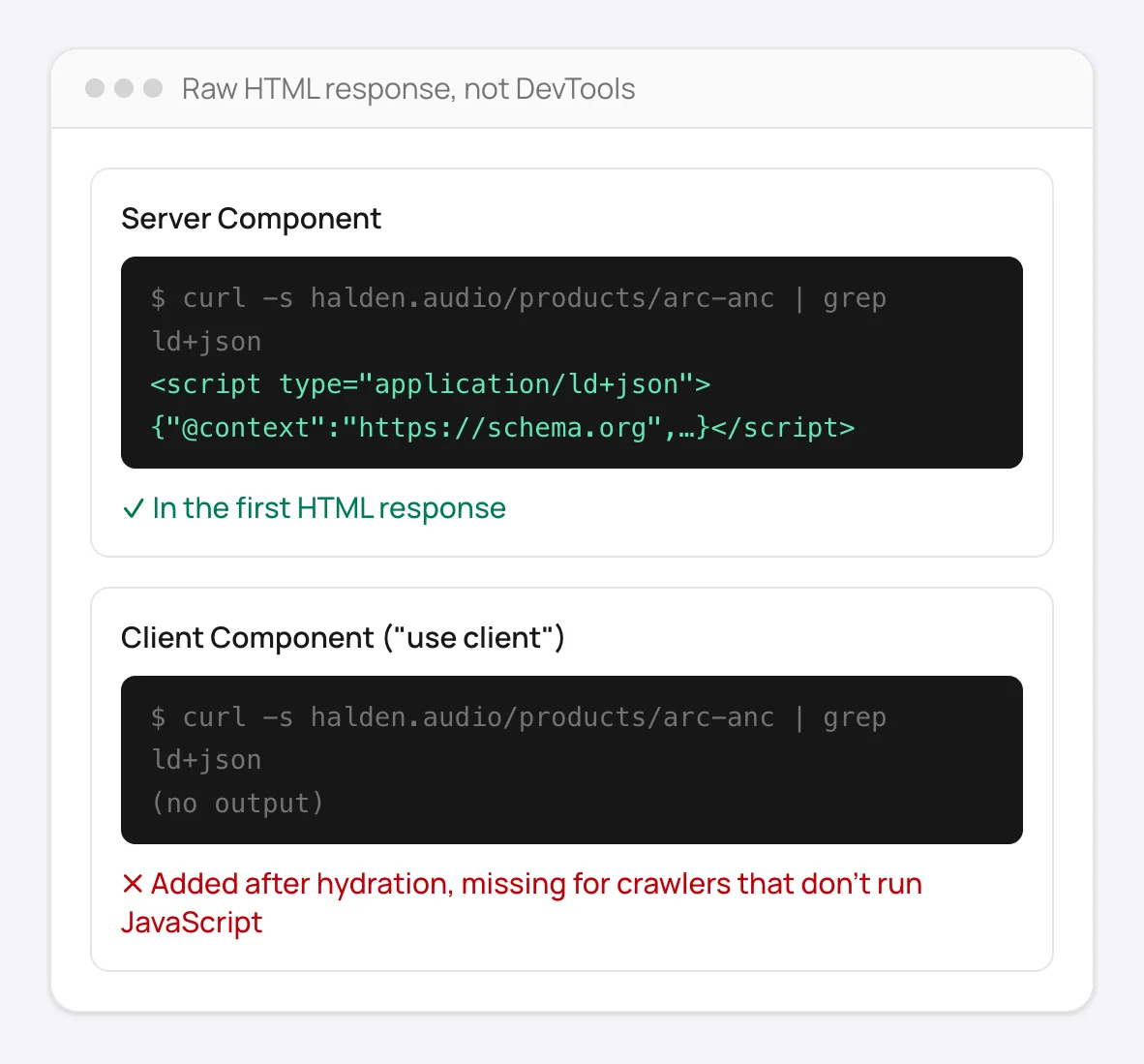
The raw response tells the truth: a Server Component's script tag is there, a Client Component's isn't.
Good to know
The same rule applies to Remix, Astro in SSR mode, and any other React meta-framework: render the schema server-side, don't inject it client-side after the page loads.
For dynamic pages (a specific product or article), generate the JSON-LD inside the page component using the same data you already fetch for the page itself, not a static, hardcoded object.
How to add JSON-LD to Next.js manually
Without FullSchema: what the same result takes by hand.
In Next.js you're writing code either way, so doing it by hand is mostly about getting the data model right.
- 1. Build it from the data you already fetch
- Create the JSON-LD object in the same Server Component that fetches the page's data, so the markup and the page can't drift apart. The
schema-dtspackage gives you TypeScript types for schema.org and catches misspelled properties at build time. - 2. Choose types and fields deliberately
- Pick the most specific schema.org type per route and check Google's documentation for the fields it needs. Leave out values the page doesn't show, even if your database has them.
- 3. Render it safely and check the HTML
- Render a plain
<script type="application/ld+json">from the Server Component and escape<in the serialized JSON. Then check the built page's source, not DevTools, and run a few routes through the Rich Results Test. - 4. Test it like the rest of your code
- Add a test or build step that renders a few representative pages and validates their JSON-LD, so a refactor that renames a field doesn't silently remove your rich results.
What people ask about Next.js schema, answered
Collected from Reddit, the Next.js community and SEO forums. Straight answers, including the cases where you don't need us.
I get a hydration mismatch as soon as I add a JSON-LD script.
You're rendering the script through next/script or inside a Client Component. Render a plain <script type="application/ld+json"> with dangerouslySetInnerHTML in a Server Component, the way the Next.js docs show. Nothing about it needs to hydrate.
next/script or a plain script tag?
Plain script tag. next/script is for JavaScript that runs; it adds the content to the hydration payload and can defer or move the tag. JSON-LD is inert data and belongs in the server HTML as is.
Should the schema live in layout.tsx or page.tsx?
Site-wide entities (Organization, WebSite) in the root layout, once. Page-specific types in the page component that already has the data. Don't put Product in a layout that wraps every route.
How do I build the JSON-LD for dynamic routes like /products/[slug]?
Use the same object you fetch for the page: map its fields into the schema object inside the Server Component and serialize with JSON.stringify. Generate one example with FullSchema for a live product URL to see which properties Google actually wants for that type, then template it.
Do I need to escape anything in the JSON?
Replace < with \u003c before injecting, so a value containing </script> can't break out of the tag. The docs' snippet does exactly that.
With ISR or static export, is the schema in the HTML?
Yes, as long as it's rendered by a Server Component; the generated HTML contains it. Verify on the deployed URL with View Page Source, not DevTools. If it's missing there but visible in DevTools, a Client Component is injecting it.
Not sure what your Next.js pages have today? The site report is free.
Check every page freeNext.js structured data questions
Can I put this in generateMetadata instead?
generateMetadata is for the head metadata Next.js manages for you directly (title, meta tags, OpenGraph); it doesn't have a first-class slot for an arbitrary script tag. Rendering the script directly in your Server Component's JSX is the more direct route and behaves the same way for crawlers.
Why does my schema show up in DevTools but not in view-source?
That's the exact symptom of a Client Component: React is injecting the tag after the page loads, so it's real in the rendered DOM but absent from the HTML your server actually sent. Move the script tag into a Server Component to fix it.
Does this work the same way with the Pages Router?
Yes, same idea: render the script tag server-side, for example inside a getServerSideProps-backed page or _document.tsx for something site-wide, rather than injecting it from client-side JavaScript.
Ready to generate Next.js schema?
Paste your page's URL and FullSchema handles the rest. No dropdowns, nothing to fill in by hand.