
Add schema markup to Squarespace
Give Google and AI assistants your hours, phone, address and menu exactly as your site lists them. On the Core plan, every Squarespace page has a box for it.
- No app, just the page's
Page Header Code Injectionbox - Blog posts and products: a Code block on the page
- Paste, save, publish
- Restaurant, LocalBusiness, Product, Event and more
Your page
HoverTap a detail to trace it
Mediterranean restaurant · Portland, OR
Olive & Ash
Mezze · Wood-fired grill · Natural wine
Hours
Tue to Sun, 5 PM to 10 PM
Contact
(503) 555-0142
2337 SE Division St, Portland, OR 97202
FullSchema reads it and writes the schema search engines and AI read.
What search engines know
Restaurant
- Business
- Olive & Ash
- Menu
- Mezze, Wood-fired grill, Natural wine
- Hours
- Tu-Su 17:00-22:00
- Phone
- +1-503-555-0142
- Address
- 2337 SE Division St, Portland, OR 97202
Mediterranean dinner on Division open Sunday?
Olive & Ash at 2337 SE Division St is open Tue to Sun, 5 PM to 10 PM. Call (503) 555-0142 to book. On the menu: mezze, wood-fired grill, natural wine.
oliveandash.com<!-- Core plan or higher --><script type="application/ld+json">{"@context": "https://schema.org","@graph": [{"@type": "Restaurant","@id": "https://oliveandash.com/#restaurant","name": "Olive & Ash","description": "Mediterranean kitchen on Division: mezze, a wood-fired grill and natural wine.","url": "https://oliveandash.com/","image": "https://oliveandash.com/media/dining-room.jpg","logo": "https://oliveandash.com/media/logo.png","telephone": "+1-503-555-0142","priceRange": "$$","servesCuisine": "Mediterranean","hasMenu": {"@type": "Menu","url": "https://oliveandash.com/menu","hasMenuSection": [{ "@type": "MenuSection", "name": "Mezze" },{"@type": "MenuSection","name": "Wood-fired grill"},{ "@type": "MenuSection", "name": "Natural wine" }]},"acceptsReservations": true,"address": {"@type": "PostalAddress","streetAddress": "2337 SE Division St","addressLocality": "Portland","addressRegion": "OR","postalCode": "97202","addressCountry": "US"},"openingHoursSpecification": [{"@type": "OpeningHoursSpecification","dayOfWeek": ["Tuesday","Wednesday","Thursday","Friday","Saturday","Sunday"],"opens": "17:00","closes": "22:00"}],"sameAs": ["https://www.instagram.com/oliveandashpdx"]},{"@type": "WebSite","@id": "https://oliveandash.com/#website","url": "https://oliveandash.com/","name": "Olive & Ash","publisher": { "@id": "https://oliveandash.com/#restaurant" }},{"@type": "WebPage","@id": "https://oliveandash.com/#webpage","url": "https://oliveandash.com/","name": "Olive & Ash | Mediterranean restaurant in Portland, OR","isPartOf": { "@id": "https://oliveandash.com/#website" },"about": { "@id": "https://oliveandash.com/#restaurant" },"inLanguage": "en-US"}]}</script>Short answer
To add schema markup to Squarespace, open the page's settings, go to Advanced, paste the JSON-LD block into Page Header Code Injection and save. Blog posts and products don't have that box, so their code goes in a Code block on the page. Both need the Core plan or higher.
- Plan needed
- Core or higher (Business on older plans)
- Where it goes
- Page settings → Advanced
- Setup time
- ~3 minutes
Updated
How to add it
- 1
Generate the code
Paste the published page's URL into FullSchema. A page behind a password or still in draft can't be read.
Copygives you the block with its<script>tags, the format both code injection and Code blocks take. - 2
Paste it into the page's header
In the
Pagespanel, hover over the page, click the gear icon and openAdvanced. Paste the code intoPage Header Code Injectionand save. It applies to this page only.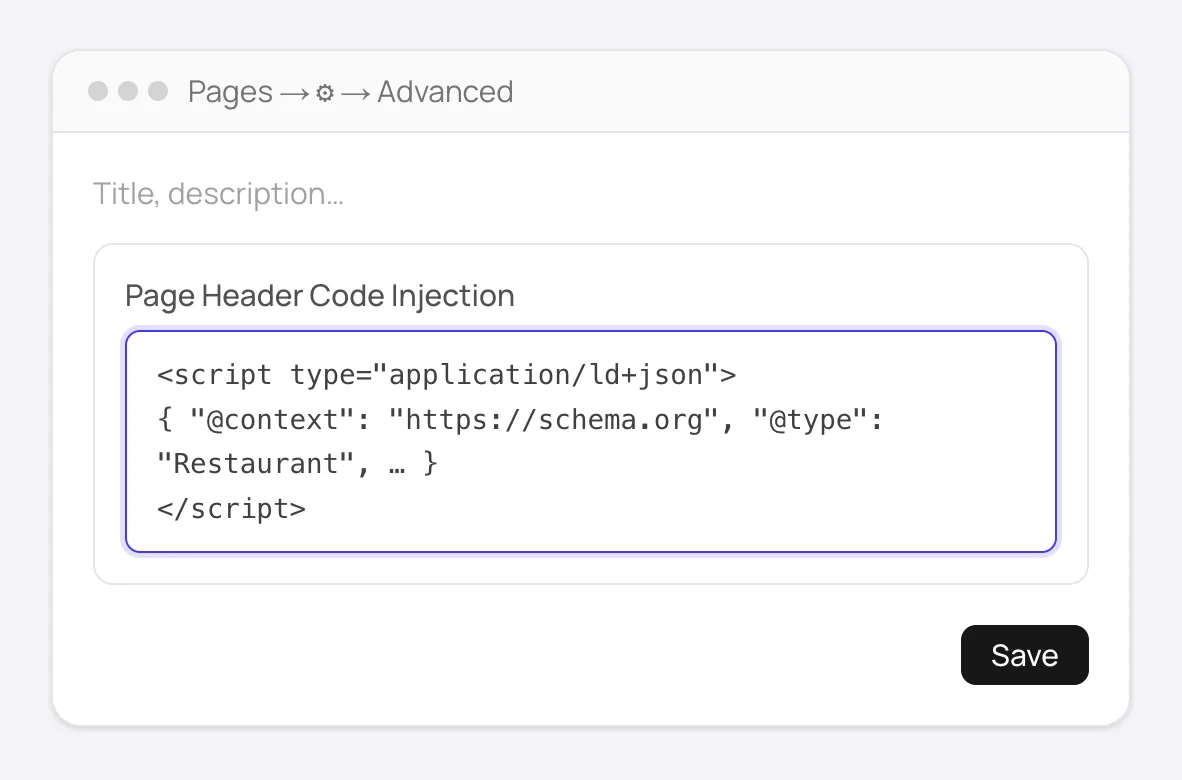
Pages → gear icon → Advanced: paste the block into Page Header Code Injection and save. - 3
Blog posts and products: use a Code block
A single blog post or product has no header box of its own. Add a
Codeblock inside the post, or in the product's additional information area, paste the code and save. KeepDisplay Sourceoff; the block looks empty, which is right. Skip the blog'sPost Blog Item Code Injection: it repeats on every post.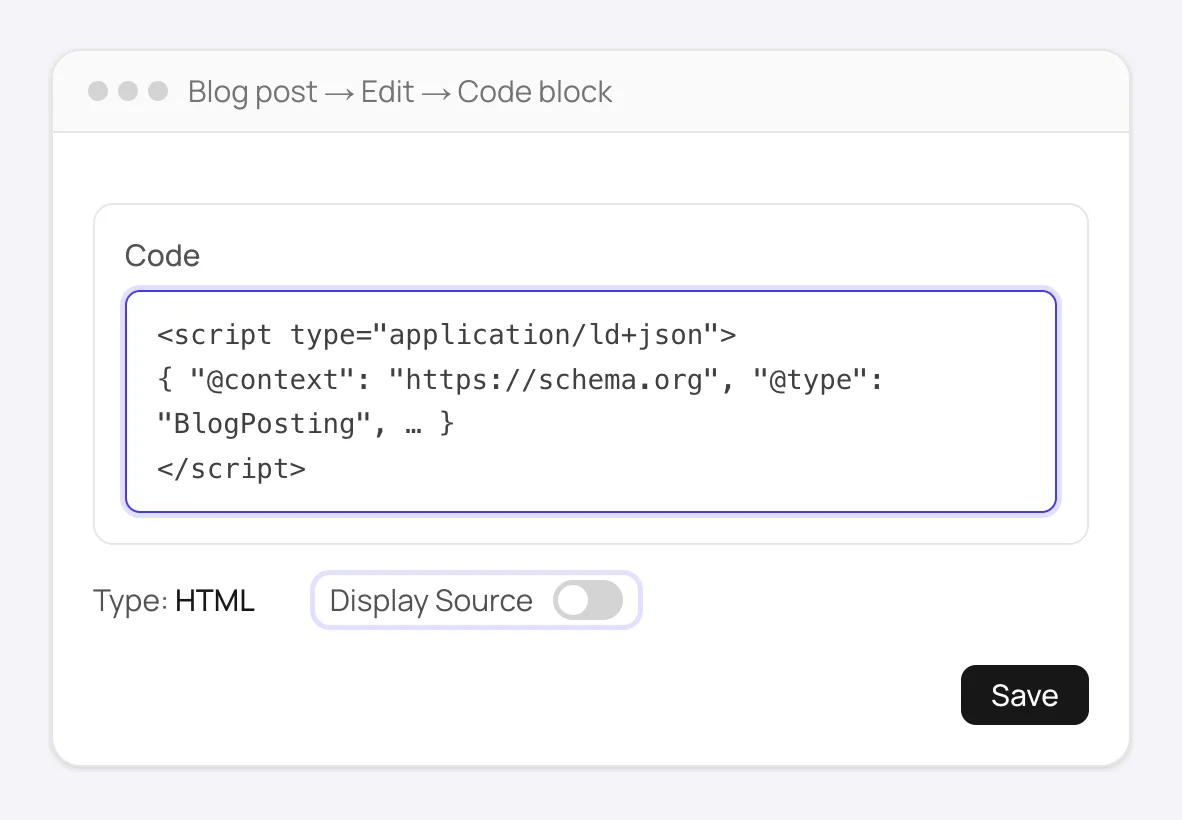
Inside the post or product: a Code block, type HTML, Display Source off. It looks empty on the page, which is right. - 4
Publish the page
Confirm it's actually published, not sitting as an unpublished draft.
- 5
Verify on the live page
View the live page's source and search for
application/ld+json.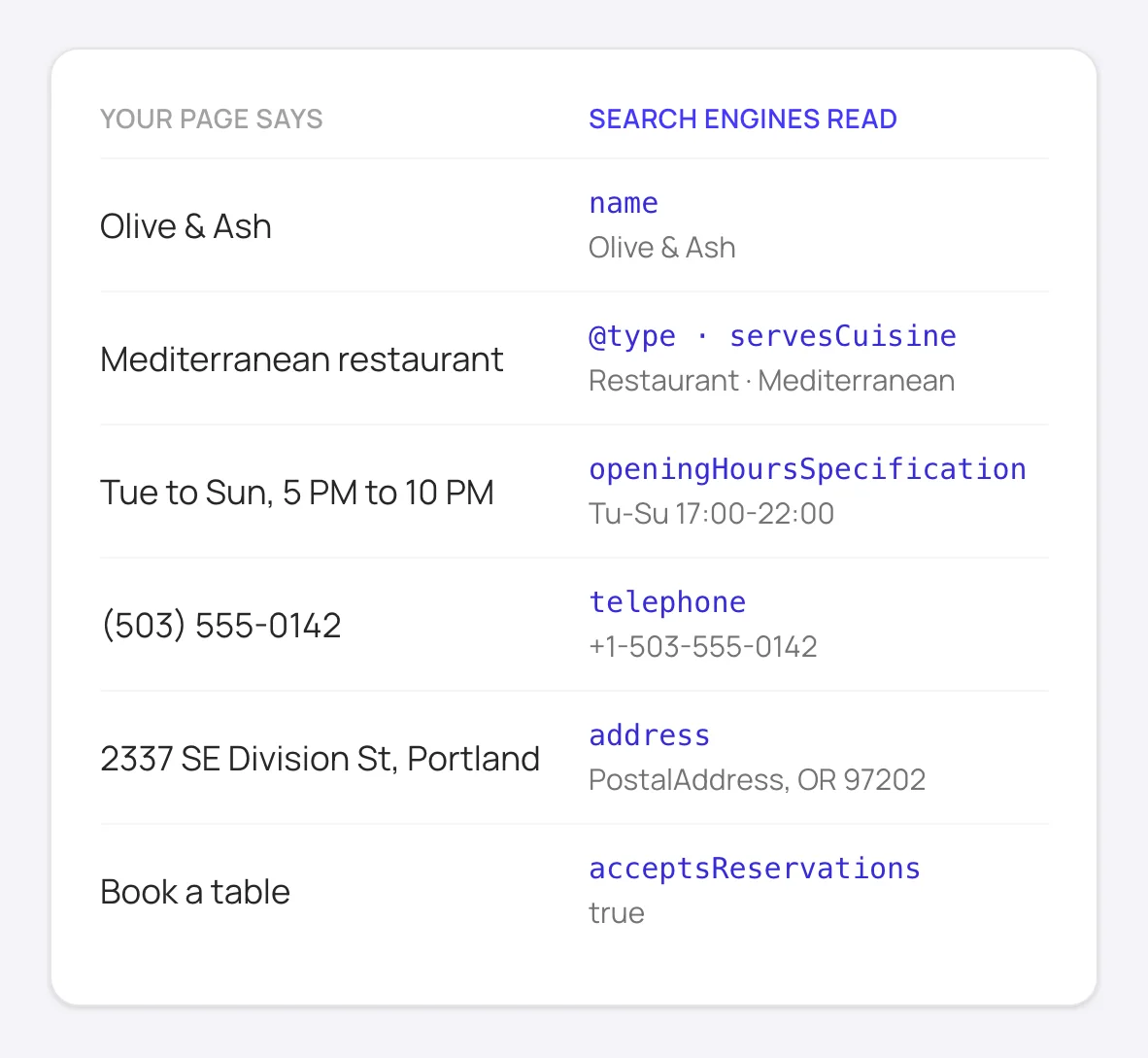
What the markup tells search engines and AI assistants: the same details your page shows, in a form they can read.
Good to know
Site-wide details, like your Organization or LocalBusiness, go in the site-wide Code Injection header once. In version 7.1 it's under Website → Pages → Custom code → Code Injection. Page-specific schema doesn't belong there: it would repeat on every page.
On Basic or the legacy Personal plan, code injection isn't available and Code blocks don't run scripts. Forum workarounds exist, but Squarespace doesn't support them and they can stop working without notice.
How to add schema to Squarespace manually
Without FullSchema: what the same result takes by hand.
You can go past Squarespace's built-in markup on your own. Expect it to take longer per page; these are the steps.
- 1. Complete what Squarespace uses
- Squarespace builds its business markup from
Settings → Business Information. Fill in the address, phone and hours there and keep them matching what the site shows. It's the cheapest improvement you can make, and it helps the rest of your markup agree with it. - 2. Write page-specific blocks by hand
- For a service, an FAQ or a detailed product, write a JSON-LD block: choose the most specific type on schema.org, check Google's documentation for the fields it needs, and use only what the page shows. Paste it into the page's header code injection, or a Code block in a blog post or product.
- 3. Validate the published page
- Run the live URL, not the editor preview, through the Rich Results Test, and check the Schema Markup Validator for types Google doesn't display. Look for two blocks describing the same product or business: Squarespace's and yours.
- 4. Update it with the page
- Code injection doesn't follow your edits. When you change a price, hours or a service on the page, open the block and change it too, so the markup and the page never disagree.
What people ask about Squarespace schema, answered
Collected from Reddit, the Squarespace community and SEO forums. Straight answers, including the cases where you don't need us.
Squarespace adds schema automatically. Do I still need my own?
It adds a thin layer: WebSite, Organization or LocalBusiness from your business information, and basic Product, Article and Event blocks. They carry the minimum fields, so a product page rarely qualifies for price and availability rich results, and a service page gets nothing. Generating a complete block for the pages that matter and adding it alongside is how most Squarespace sites get past the basics.
Code Injection isn't in my settings. Am I on the wrong plan?
Probably. Code injection, site-wide and per page, needs the Core plan or higher (Business on older billing). Basic and the legacy Personal plan don't support script tags in Code blocks either, so there's no supported way to add JSON-LD on them.
I pasted into a Code Block and the code is printed on the page as text.
The block's Display Source toggle is on, or you used a Markdown or Text block. Use a Code Block, set the type to HTML, and turn Display Source off. The block will look empty in the editor, which is correct: JSON-LD is invisible.
An SEO tool says it can't see my schema, but Google's Rich Results Test does.
Squarespace doesn't hide anything; the code is in the HTML. Some audit tools fetch a cached or stripped version of the page, or don't handle Squarespace's compressed markup. If View Page Source on the live URL shows application/ld+json and the Rich Results Test detects it, you're done.
If I put LocalBusiness schema in header Code Injection, it's on every page. Is that a problem?
It's acceptable for Organization or LocalBusiness details, since that's one entity for the whole site. Page-specific schema (a product, a post, an event) should not repeat everywhere; put it in that page's header injection, or a Code block on the post or product.
Where do I add schema to a single blog post?
Add a Code block inside the post and paste the code there; it only affects that post. The blog page's Post Blog Item Code Injection looks like the right spot, but it's added to every post on the blog. Both need the Core plan or higher.
Not sure what your Squarespace pages have today? The site report is free.
Check every page freeSquarespace schema markup questions
I'm on the Basic or Personal plan. Can I still add schema markup?
Not in a supported way. JSON-LD sits in a script tag, and Squarespace allows script tags only on the Core plan and above, through code injection or Code blocks. On Basic, what you can do is fill in Business Information completely, since Squarespace's own markup is built from it.
Site-wide Code Injection or the page's header injection?
The page's header injection for anything about that page: a service, a product, an event, an FAQ. Site-wide Code Injection only for what's true on every page, which in practice is your Organization or LocalBusiness block.
What schema does a Squarespace service page need?
Usually a Service that names your business as the provider, plus FAQPage if the page has real questions and answers. Squarespace adds nothing for service pages on its own, so this is where your own block makes the biggest difference.
Ready to generate Squarespace schema?
Paste your page's URL and FullSchema handles the rest. No dropdowns, nothing to fill in by hand.