
The schema markup generator that reads the page for you.
FullSchema writes complete, validated JSON-LD from what's on your page, so Google and AI search understand what you offer.
You don't choose a type or fill in a form. You paste a URL.
Your page
HoverTap a detail to trace it
TrailForge
Trail Runner GTX
4.8 (214 reviews)
Reviews
Read all 214 reviews
Shipping & returns
Free shipping · 30-day returns
FullSchema reads it and writes the schema search engines and AI read.
yoursite.com › products › trail-runner
Trail Runner GTX
4.8 (214)·$129.00·In stock
Free delivery · 30-day returns
Waterproof trail shoes under $150?
The Trail Runner GTX from Summit Supply Co. is $129.00, rated 4.8 from 214 reviews, and in stock with free shipping.
yoursite.comSee it work in about a minute.
From a URL to complete, validated schema, and what happens after it's on your site.
Three steps. Nothing to set up first.
About a minute end to end. A fourth, optional step keeps the schema current when the page changes.
Paste your page's URL
No setup. Just the link.
FullSchema scans it and writes the schema
The right schema.org types, grounded only in what's actually on the page.
<script type="ld+json">Add it to your page
Paste the block into that page and publish, or add it in one click on WordPress. Works with Shopify, Wix, Squarespace, or anything else.
Keep it current with Site Monitor
Optional. A weekly check tells you when a page changed, a block went missing, or new pages appeared.
Most schema markup generators make you do the typing.
- Pick a type from a dropdown.
- Fill in a dozen fields by hand.
- Repeat for each page on your site.
FullSchema skips all of it. Paste a URL and it reads the page itself, decides which schema.org types actually apply, and writes the complete JSON-LD without you typing a single field.
- Checked against the real vocabulary. Every property is checked against schema.org itself, not just for valid JSON.
- Nothing is invented. Ratings, prices and dates go in only if they're on the page.
- Missing something? You get advice in plain English, not an error code.
{"@context": "https://schema.org","@graph": ["@type": "Product","@id": "https://yoursite.com/products/trail-runner#product","name": "Trail Runner GTX",from h1"description": "Waterproof trail shoe with a Vibram outsole.","gtin13": "4056487201315",from specs table"image": "https://yoursite.com/img/trail-runner.jpg",}]}▸ Open a line to see where each value came from.
Every block is checked against 21 rules before you see it
Valid against schema.org itself
12 checks. Real types, properties that belong to them, values of the right kind, ISO dates, resolvable @id links.
Eligible for Google rich results
5 checks. The fields Google requires per type, priced offers, fetchable images, no Product without an offer.
Nothing invented
3 checks. Phone numbers, addresses, dates, prices and coordinates only if they are verifiably on the page. No made-up ratings.
Nothing on the page left out
1 check. Maps, phones, emails, addresses, videos and FAQs found in the HTML must show up in the schema.
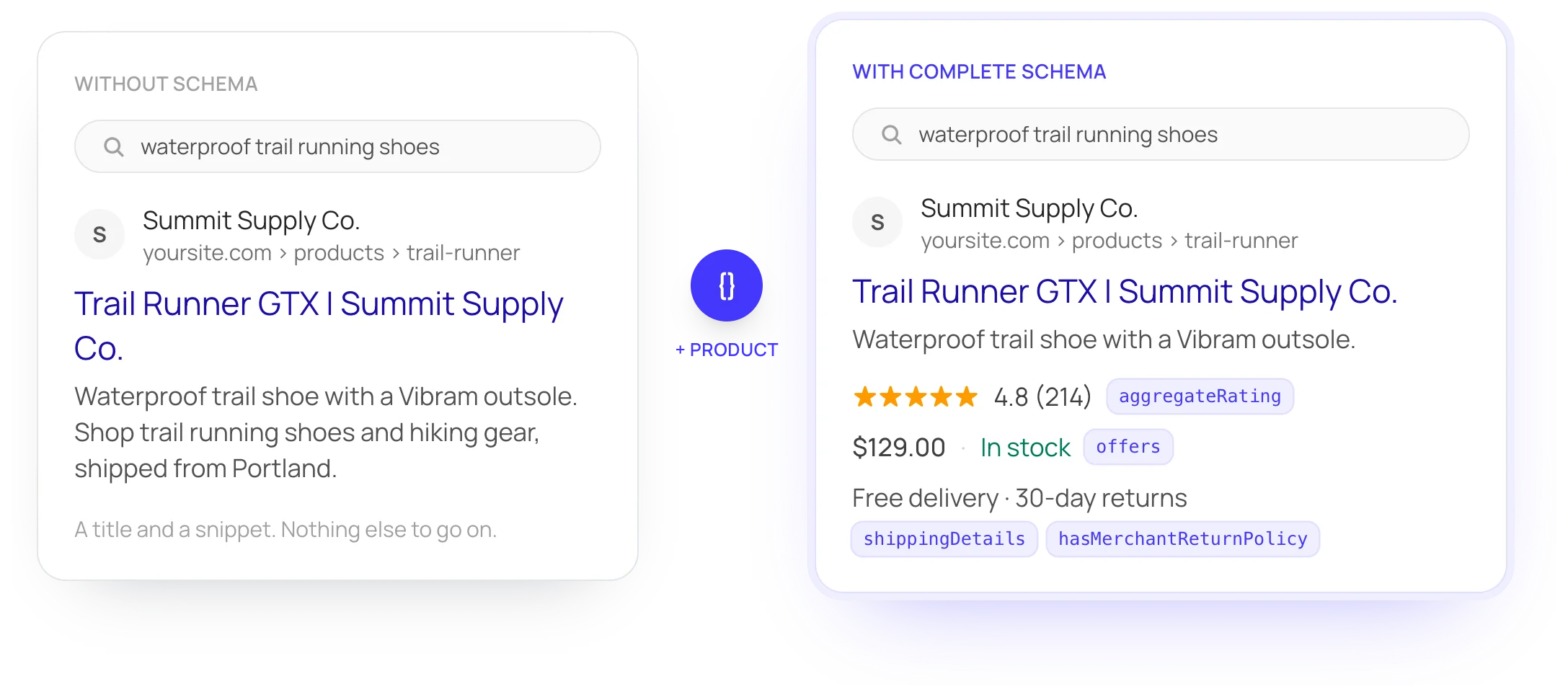
Same page, same listing. More of it shows.
Schema doesn't buy a higher position. It tells Google what the page already says, the rating, the price, the stock, so the result can show it instead of a plain blue link.
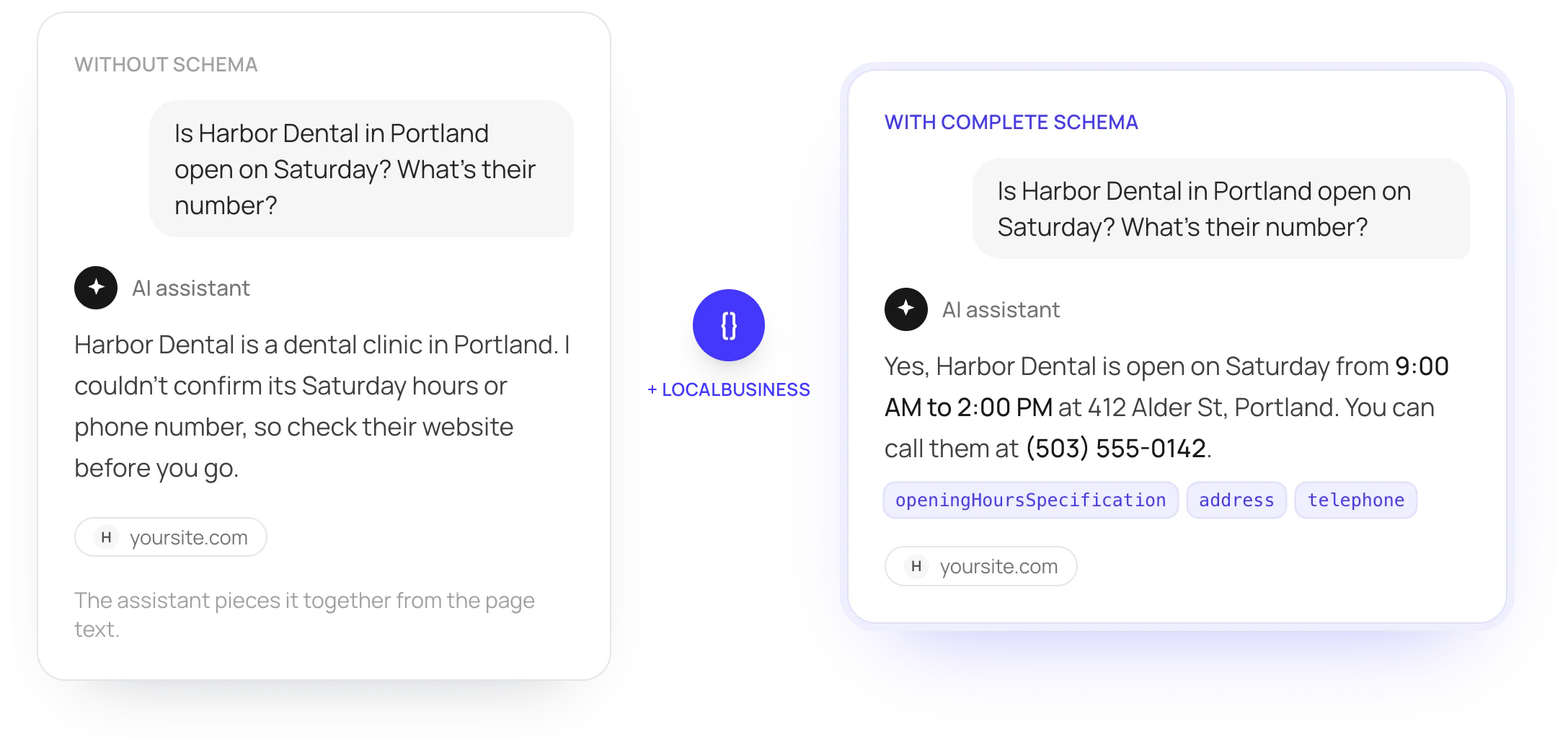
Same block, read by assistants. Facts, not guesses.
AI assistants like ChatGPT, Gemini, Claude and Perplexity read schema too. The block sits in your page's HTML, so crawlers that skip JavaScript get it on the first request, and an assistant can answer with your hours, phone, prices or stock instead of telling people to check the website.
You don't pick. FullSchema does.
FullSchema reads the content and matches it to the schema.org type that actually applies: a recipe blog gets Recipe, a job listing gets JobPosting, a help page gets FAQPage.
Made for whoever looks after the website.
The agency with twenty clients, the marketer with a hundred pages, the store with a growing catalog, the owner who also does the website. Pick the one that sounds like you.
Schema for all your client sites, whatever they're built on.
The process is the same on any stack: paste the URL, paste the block. No seats, no monthly minimum, nothing to install on the client's site.
- Add each client's site and run the free report. It gives you a clear before picture for a proposal or a kickoff call.
- Works on WordPress, Shopify, Wix, Squarespace, Webflow, GoDaddy, Duda, Framer and Next.js, and anything else that accepts a script tag.
- Buy credits once and spend them across clients: $4 a page at 50, $3 at 200.
- Monitor ($12 per site a month) watches the sites you've handed over and tells you when something drifts.
Schema it writes for pages like yours
- LocalBusiness
- Product
- Service
- Hotel
- Event
- JobPosting
- SoftwareApplication
Complete, validated schema across a whole site, without typing JSON.
You know what schema does. The hard part is doing it properly on every page, and keeping it right after the site changes.
- A free report on all pages in the sitemap: no schema, basic or incomplete schema (with its types and gaps listed), or covered.
- Existing blocks are compared with what the page says today, so you see what's missing, wrong or out of date.
- 21 checks against schema.org and Google's requirements run before you see the result.
- One Organization for the whole site, linked by @id, so every page describes the same business.
Schema it writes for pages like yours
- Organization
- WebPage
- BreadcrumbList
- LocalBusiness
- Service
- FAQPage
- ItemList
Product pages with the details that earn rich results.
Shopify and WooCommerce write a basic Product block. What usually goes missing is the part Google can show under your listing: shipping and returns.
- Price, currency, stock, brand, GTIN, ratings, shipping and returns, all taken from the product page itself.
- When a page offers sizes or colors, the variants are grouped under one ProductGroup.
- Monitor re-checks every week and emails you when the schema no longer matches the page, like a price that changed.
- From $3 a page at 200 pages or more, with no monthly plan to keep paying.
Schema it writes for pages like yours
- Product
- ProductGroup
- Offer
- OnlineStore
- MerchantReturnPolicy
- AggregateRating
- Brand
You run the business. The website is one job out of fifty.
Clinics, trades, law firms, restaurants, hotels, gyms. People ask Google and AI assistants who's open near them, who does emergency callouts, which clinic takes new patients. Schema is how your hours, services, address and phone reach those answers intact.
- Paste the address of your homepage or a service page. There's no form to fill in about your business.
- Hours, phone, address, service area and the services you list are read from your own pages. If it isn't on the page, it isn't in the schema.
- The guide for your site builder shows exactly which box to paste into on Wix, Squarespace, GoDaddy and the rest. On WordPress, connect the free plugin once and send with one click.
- Your $10 free balance covers your first 2 pages. No card needed.
Schema it writes for pages like yours
- Dentist
- Plumber
- Attorney
- Restaurant
- Hotel
- ExerciseGym
- AutoDealer
- ChildCare
Posts that say what they are, who wrote them and when.
Search engines and AI assistants look for the author, the date and what kind of page they're reading. A recipe should read as a recipe, a guide as a guide.
- Article or BlogPosting with author, dates, headline and images. Recipe when the post is a recipe, FAQPage when there's a real Q&A.
- Keep your SEO plugin. With Yoast or Rank Math, the new block links into their graph instead of repeating it.
- Start with the posts that already get traffic. The free site report shows which ones have nothing yet.
- Works on pages in any language, not just English.
Schema it writes for pages like yours
- BlogPosting
- Article
- Recipe
- FAQPage
- VideoObject
- Person
- Book
JSON-LD you own, in the HTML you ship.
No runtime script, no SDK, no vendor call on page load. You get a static block, or a Next.js Server Component, and put it where it belongs.
- Switch the code view to Next.js and copy a ready PageSchema Server Component.
- A linked @graph with stable @ids, not a pile of separate blocks.
- Every value is traced to the page. Nothing is filled in with plausible defaults.
- Checked against 21 schema.org and Google rules before you copy it.
Schema it writes for pages like yours
- WebApplication
- SoftwareApplication
- WebPage
- Organization
- WebSite
- BreadcrumbList
The usual ways
What one page of schema usually costs
Most of it is paid page by page, and again whenever a page changes.
Hire a specialist
$80 to $150 an hour
Do it yourself
Free, plus your hours
A schema plugin
From about $99 a year
FullSchema
$5 a page$3 at 200+
- About a minute per page
- Nothing to type
- Failed scans refunded
Any skill level
Whatever you know about schema
Never heard of schema
That's fine. Paste a URL, copy the result, and paste it where your platform's guide says. No terms to learn.
Know the basics
See which types apply to the page and what your existing block was missing. Flag a wrong type if you disagree.
Write it by hand today
Skip the typing and keep the control. Edit key fields before you publish, or take the JSON and change anything you like.
Any platform. Paste it in, or add it in one click on WordPress.
FullSchema outputs plain JSON-LD, the format Google and Bing read on any platform. Each page gets its own block. On WordPress the free plugin adds it for you; everywhere else you paste it into that page and publish.
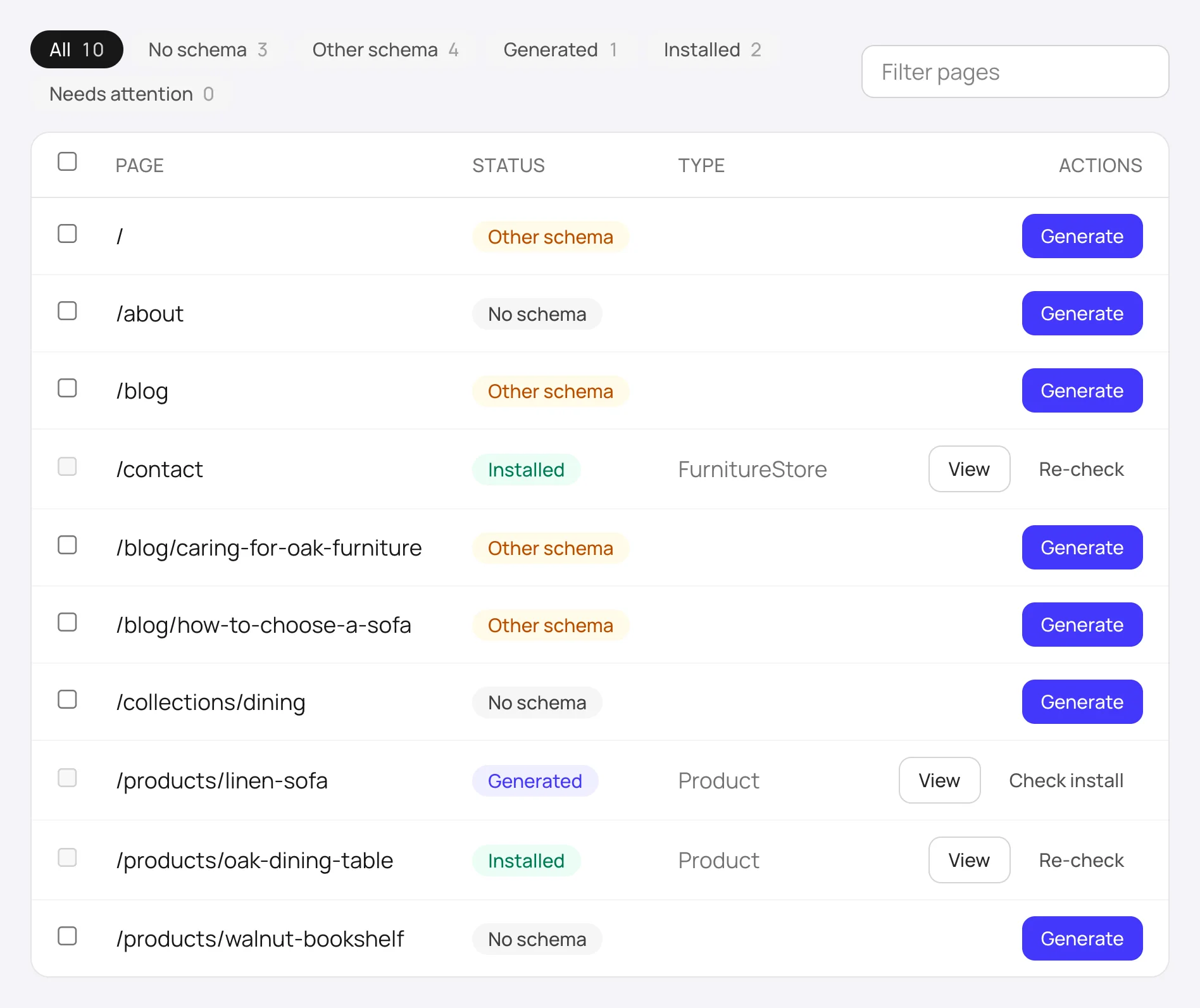
See where every page stands before you spend a credit.
Add your domain and FullSchema lists every page from your sitemap, then reads up to 1,500 of them and tells you which pages have no schema at all, which have only basic or incomplete schema and what's missing, and which already have FullSchema installed.
No credit, no card. The report is free and stays in your account. Pick the pages that matter and generate for them one at a time or all at once.
"My page has schema" usually means a plugin wrote a stub years ago.
Most existing blocks come from a theme or SEO plugin: a generic type, a handful of fields, empty arrays, and nothing about the products, branches, or FAQs that were added since.
FullSchema reads what's there, checks it against what the page says today, and shows you exactly what's missing, wrong, or outdated. Then it writes the complete block from scratch so nothing has to be patched.
Two blocks describing one business compete. Your results page tells you which one to keep and why, in plain language.
- @type
- FoodEstablishmenttoo generic
- Bakery
- properties
- 9
- 21
- sameAs
- [ ]empty
- 4 profiles
- products
- none8 on the page
- 8, with specs
- priceRange
- "B2B"not a range
- removed, not on page
- HowTo
- none
- 4 steps
- verified
- 2023
- today, line by line
Every value in the new block appears on the page. Anything that doesn't is left out, not guessed.
Start free
$10on us
Enough for 2 full page scans on a site you actually run. See the real output before you decide anything.
No credit card
Google or an email code. Ten seconds.
No trial clock
The full product, not a cut-down demo.
$5 a page after
$4 at 50 or more, $3 at 200 or more. Pay as you go.
Failed scans refunded
If a page can't be read, you don't pay.
Still have questions?
Get in touch. Whatever's on your mind, big or small, we'd rather hear it than have you guess.
No. You paste a URL, FullSchema reads the page and decides what to generate. You don't need to know property names or which type applies to your content.
You can, and for one page you'll get something that looks right. The problems are the ones you can't see. A chat assistant writes from what you paste into it and fills the gaps with plausible guesses: a rating, opening hours, a price that isn't current. It doesn't check each value against your live page, or the block against Google's requirements, and it doesn't know your other pages. FullSchema reads the live page, keeps only values it can find there, checks the result against schema.org and Google's rules, links every page to the same business, and tells you when a page changes and its markup falls behind.
Because a lot of crawlers would never see it. A script that injects schema after the page loads only works for crawlers that run JavaScript. Google does, in a later rendering pass; a crawler that reads only the raw HTML never sees it. It also ties your markup to someone else's server: if the script loads slowly, fails, or you stop paying, the schema is gone. FullSchema gives you a block that sits in your own HTML. Every crawler reads it on the first request, it adds no extra request to your page, and it stays yours. When a page changes, Monitor tells you which block to update.
No tool can guarantee that. Rich result eligibility depends on Google's own criteria and changes over time. What FullSchema does is write markup from your page's actual content and check it against schema.org and Google's rules, which is what eligibility starts with.
No. Paste a URL and claim a $10 free balance (Google or email, no card required). That covers 2 page scans. After that, credits are $5 a page, $4 at 50 or more, $3 at 200 or more, with no subscription.
Whatever the page actually is: Product, Article, Recipe, JobPosting, LocalBusiness, Event, FAQPage, HowTo, and dozens of other schema.org types. You don't pick from a list. The page content decides which type fits.
Good, that's the most common case. FullSchema reads the existing block, checks it against what the page says today, and lists what's missing, wrong, or outdated. Then it writes a complete, current block from scratch rather than patching the old one. If both describe the same business, the results page explains which to keep and how to swap them.
Flag it as the wrong type, or edit key fields, like your organization details, page title, and description, directly on the results page before you publish anything.