
Check the schema markup on any page, right in Chrome
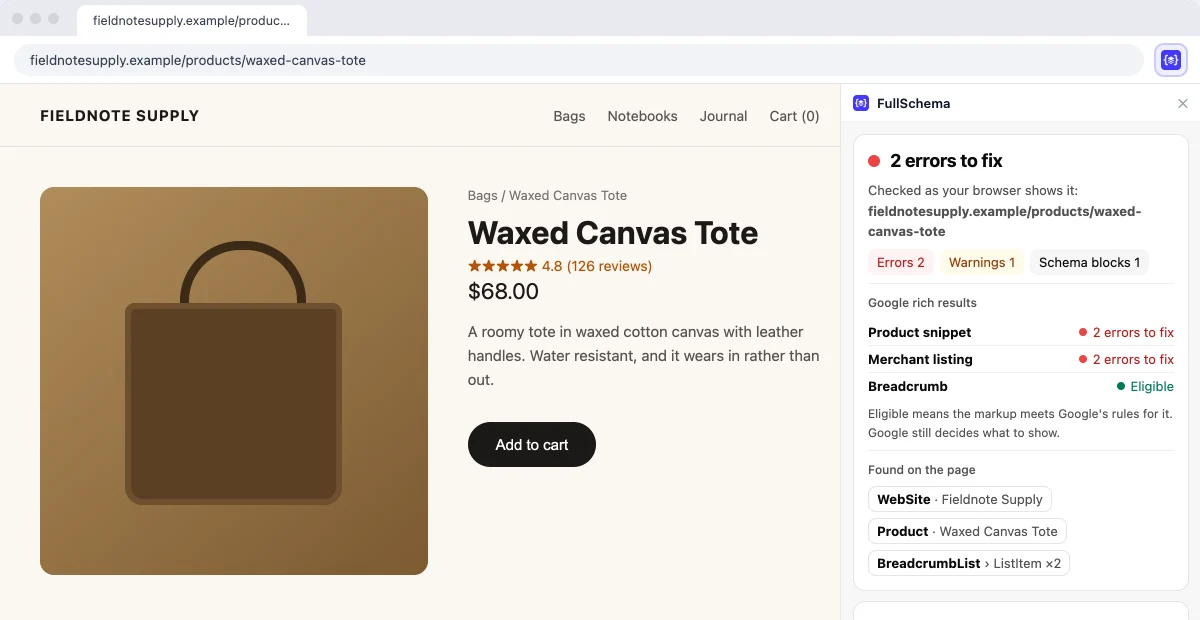
Click the FullSchema icon and a side panel checks the structured data on the page you have open. It reads the page your browser loaded, so staging sites and pages behind a login work too.
- Errors and warnings in plain English, with what to change
- Which Google rich results the markup is eligible for
- Works on localhost, staging and pages behind a login
- Free, no account, nothing changed on the page
No schema on your page yet? Paste its address and FullSchema writes it.
Short answer
The FullSchema Chrome extension is a free schema markup checker. Open a page, click the icon, and a side panel lists every error and warning in the page's JSON-LD and Microdata, checked against Google's rich result rules and the schema.org vocabulary. It also shows which Google rich results the markup is eligible for. There's no account, and it only reads a page when you click.
- Price
- Free, no account
- Works in
- Chrome 116 or later
- Reads
- Only the page you click on
By Kadir Yaz · Updated
Install once, then one click per page
- 1
Add it to Chrome
Install it from the Chrome Web Store. There's no account to create and nothing to set up. Pin the FullSchema icon to your toolbar if you'll use it often.
Open the Chrome Web Store ↗ - 2
Open a page and click the icon
A side panel opens next to the page and checks it. The extension reads nothing until you click, and only the page you clicked on.
- 3
Fix what it lists
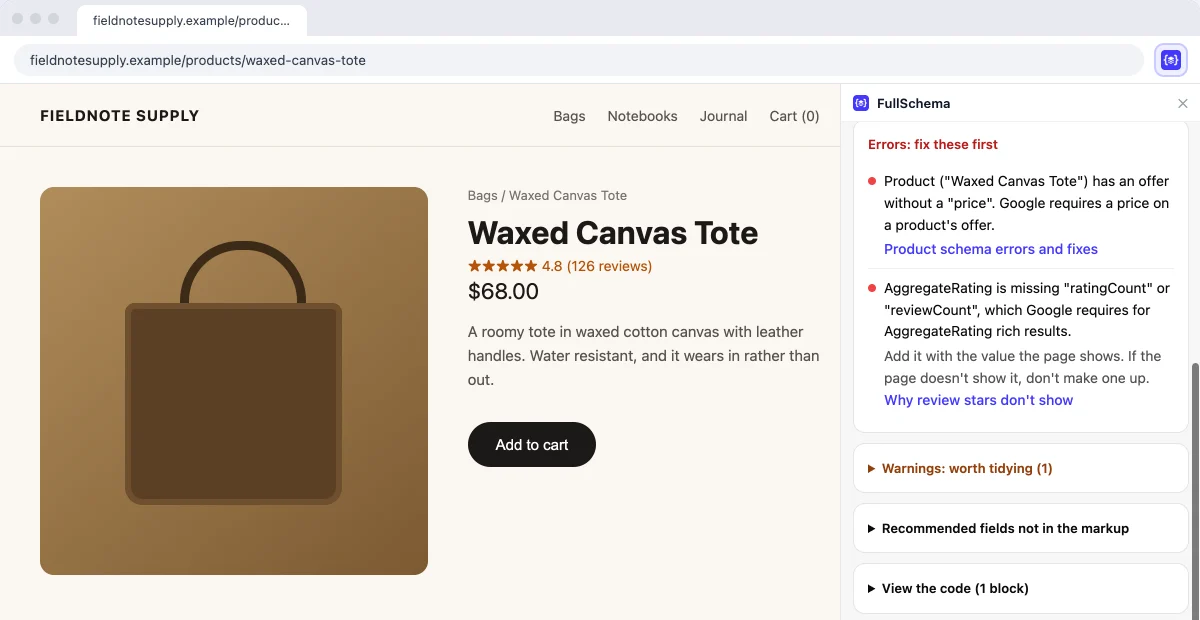
Errors first, then warnings. Each one says what to change. After you fix something, reload the page and click the icon again to check it.
It checks what your browser sees, not a copy a server fetched
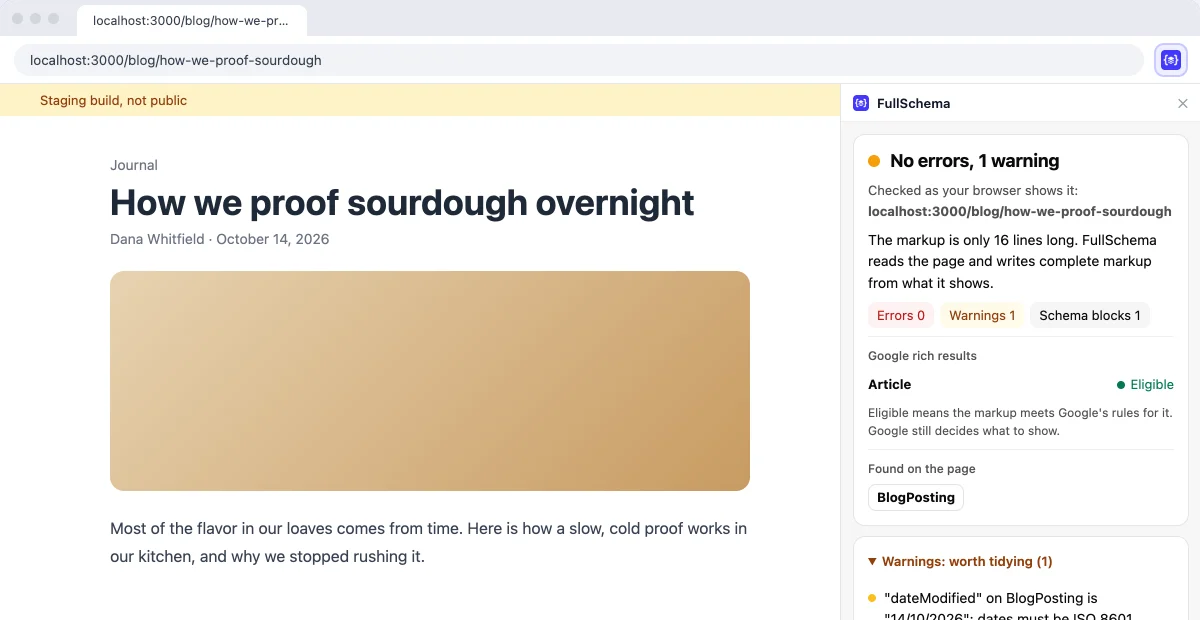
Checkers that take a URL ask a server to download the page. That fails for anything the server can't open, and some of them read the HTML before scripts run, so they miss markup added later. The extension reads the page you already have open.
Localhost and staging
Pages that aren't public yet. Check the markup before launch, while it's still easy to change.
Pages behind a login
Member areas, client previews, a page in your CMS's preview. Their content goes to the check, so only check pages you're comfortable sending.
Schema added by JavaScript
Markup that Google Tag Manager or an app adds after the page loads. The extension checks the page after your browser has run its scripts, so it sees that markup too.
Pages that show a bot check
If a site shows you a bot check first, finish it in the tab, then click the icon. The extension checks the page itself, not the challenge.
What you get for each page
The rules are the same ones behind the free schema markup validator on this site, and they follow Google's structured data documentation. They run on our server, so they stay current without an extension update.
- A short verdict, like 2 errors to fix or No errors or warnings
- The Google rich results the markup is eligible for, and what's missing where it isn't
- Every error in plain English with what to change, then the warnings
- The schema.org types on the page, such as Product, LocalBusiness or Article
- Fields Google recommends that aren't in the markup yet
- The code, block by block, with a copy button
For Google's own answer, the panel links to the Rich Results Test, with the address filled in for public pages. On public pages it also offers to open FullSchema with the address filled in, if you'd rather have the markup written for you.
It reads a page only when you click
When you click the icon, the page's address and HTML go to fullschema.app for the check. We don't store them or write them to our logs. The extension needs no account, sends no cookies with the check, and keeps nothing on your computer except the tab you clicked, until Chrome closes. The full details are in our privacy policy.
| Permission | What it's for |
|---|---|
| activeTab | Reads the current page only after you click the icon on it, so the extension has no standing access to any site. |
| scripting | Runs one function in that tab to read the page's HTML. Nothing on the page is changed. |
| sidePanel | Shows the result next to the page. |
| storage | Passes the clicked tab to the side panel, in session storage that clears when Chrome closes. |
What people ask about the extension
Is the extension free?
Yes, and there's no account or sign-in. Checking pages is free. FullSchema only charges if you use it to generate new schema for a page.
Does it change the page or my site?
No. It reads the page's HTML and shows the result in the side panel. Nothing is added to the page, and nothing on your site changes.
Does it see schema added by Google Tag Manager?
Yes. It checks the page as your browser shows it, after scripts have run, so markup added by a tag manager or an app is part of the check.
Does it check Microdata as well as JSON-LD?
Yes. It reads every JSON-LD block and the Microdata on the page as one set, the way search engines do.
If it says eligible, will I get rich results?
Not necessarily. Eligible means the markup meets Google's rules for that result. Google still decides what to show, and the markup has to match what's visible on the page.
Should I use the extension or the web validator?
Use the extension for the page you have open, including pages that aren't public. Use the web validator to test a public URL from any browser, or to paste JSON-LD before you publish it. Both run the same rules.
Is there a version for other browsers?
Only Chrome for now. In any browser, the web validator checks public pages and pasted code.
Found errors? Get the whole block written
FullSchema reads the page and writes complete JSON-LD from what it shows, checked with the same rules. Your first 2 pages are free.